What is MAC address spoofing?


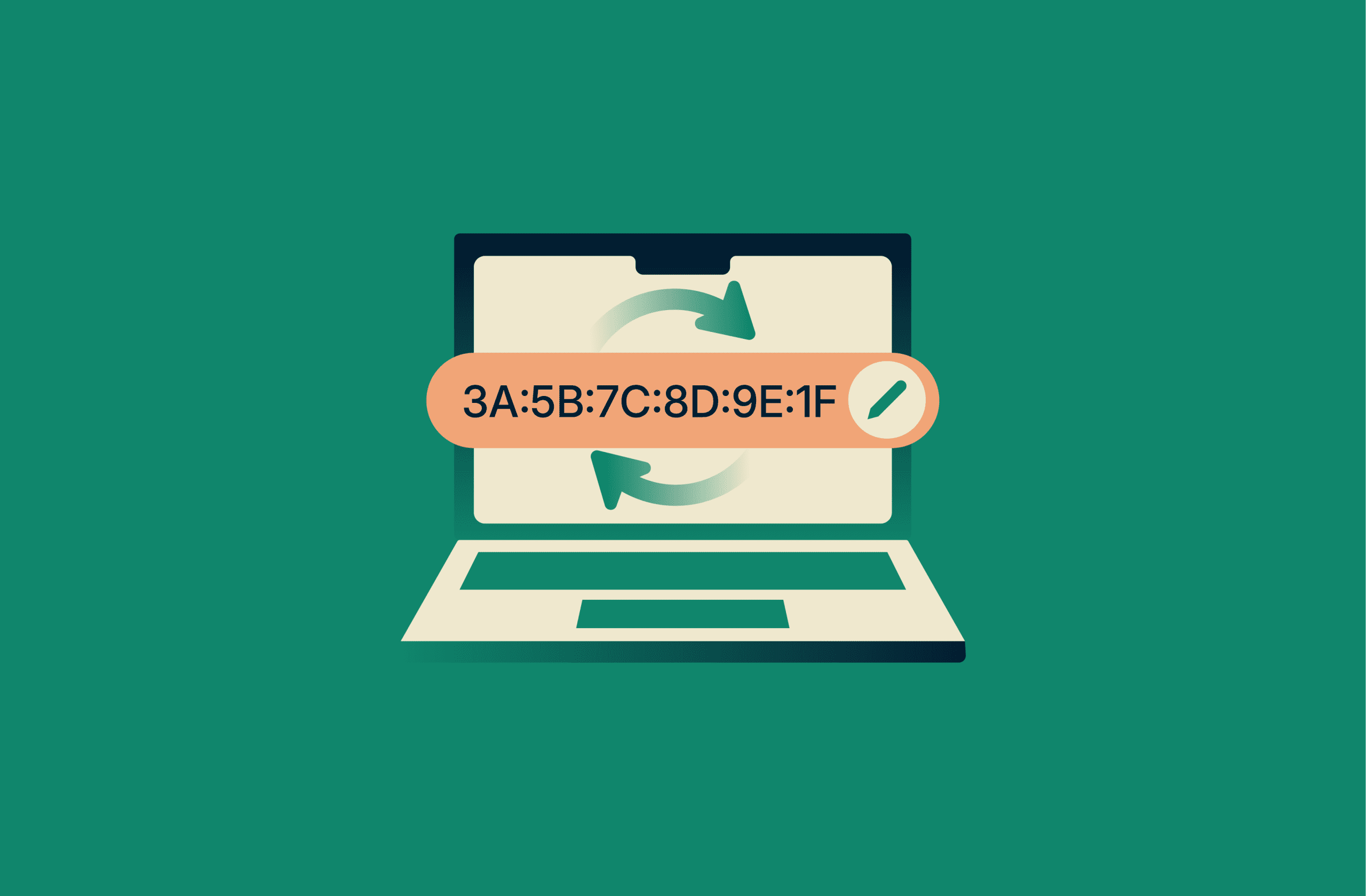
MAC address spoofing is the practice of changing a device’s Media Access Control (MAC) address so it appears to be a different device on a network.
Every device that connects to a network, including computers, phones, routers, and Internet of Things (IoT) devices, has a MAC address. Networks use this identifier to recognize devices, manage connections, and apply access rules.
This article explains what MAC address spoofing is, how it works in real network environments, and why someone might choose to change or mask a device’s MAC address. It also covers common risks, practical use cases, and ways to mitigate spoofing on shared or public networks.
Understanding MAC addresses and how spoofing works
A MAC address is a unique identifier that helps a local network recognize devices and deliver data to the correct one. In some networks, MAC addresses are also used to control access. Network administrators may allow or block specific devices based on their MAC address.
MAC addresses can also play a role in IP assignment. In certain setups, a network may assign the same IP address to a device each time it connects by matching it to its MAC address.
MAC address spoofing happens when a device is configured to present a different MAC address to a network. In many cases, this takes the form of a “locally administered address.” To the network and other connected devices, this makes it appear as if the traffic is coming from another machine.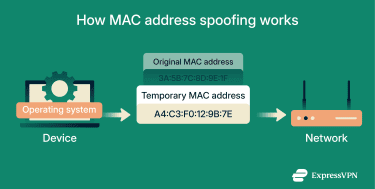
This change is typically made in one of the following ways:
- OS settings: Some systems allow users to manually set a different MAC address through network settings or built-in command tools.
- Dedicated software tools: MAC address changer tools can apply a new address automatically and may rotate addresses as part of normal use.
- Driver-level configuration: In certain setups, the MAC address can be overridden through configuration options linked to the device driver.
When the device reconnects, it uses the spoofed MAC address for that session. This can affect how the network recognizes the device, such as which rules apply to it or whether limits are enforced. Other devices and network systems then see the device as having this temporary identity, rather than its original hardware address.
Why people change their MAC address
There are a few reasons why people may change their MAC address:
- Network continuity: When a router is replaced, some internet connections expect to see the same MAC address as before. In these cases, reusing the previous MAC address through spoofing can help restore connectivity without requiring changes from the internet service provider (ISP).
- User privacy: When a device scans for Wi-Fi, it may expose identifiers that allow the same device to be recognized over time or across locations. To reduce this kind of passive tracking, many OSs randomize the MAC address or allow it to be changed.
- Device identification: Presenting a new MAC address can also cause a network to treat a device as new, which can help avoid issues linked to previous sessions. This can matter on public or shared Wi-Fi networks, where devices may be recognized even when they aren’t actively connected, or on networks that apply basic access or usage limits based on a MAC address.
Risks and implications of MAC address spoofing
When a MAC address is spoofed, it can influence access controls, device recognition, or lead network equipment to treat traffic as if it’s coming from a different device.
For network administrators, spoofed MAC addresses can reduce the effectiveness of basic security controls and make it harder to trust what’s happening on the network, whether the spoofing targets individual devices or the network itself.
- Bypassing access restrictions: Some networks use MAC addresses as a basic gatekeeper. If an unauthorized device spoofs the MAC address of an approved one, it may be able to connect without being explicitly allowed.
- Enabling rogue wireless networks: Attackers can spoof the MAC address of a legitimate access point as part of a rogue or “evil twin” setup. On unsecured or poorly configured Wi-Fi networks, this can make it harder for devices to distinguish the real network from the fake one. This can allow attackers to intercept traffic, monitor activity, or manipulate connections without users realizing they’re connected to a malicious access point.
- Disrupting existing connections: A spoofed MAC address can impersonate a device that’s already connected to the network. This can interfere with the original device’s connection or cause traffic to be sent to the wrong place, even without granting new access.
- Abusing trusted device privileges: On networks that assign elevated permissions to specific MAC addresses, spoofing a trusted address can grant those same privileges. This goes beyond basic access and may expose internal systems or settings intended only for approved devices.
- Obscuring network activity: Network monitoring tools often use MAC addresses to help associate traffic with specific devices. When a MAC address is spoofed, activity can appear to come from a different device, making it harder to accurately trace or monitor.
How to detect MAC address spoofing
Detecting MAC address spoofing usually relies on noticing unusual behavior, mismatches, or patterns that don’t align with how devices normally appear and operate on a network:
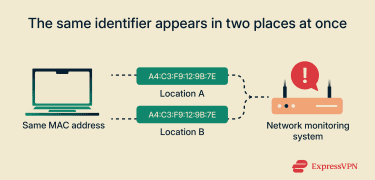
- The same identifier appears in two places at once: A single MAC address appears simultaneously on more than one network segment, switch port, or access point.
- The device doesn’t behave as expected: A MAC address associated with a known device shows activity that doesn’t match that device’s usual traffic patterns.
- Unusual reconnecting or movement patterns: A device disconnects and reappears in ways that don’t align with the normal usage or physical movement of the trusted device associated with that MAC address.
- Rapid changes in the reported device identity: The same MAC address appears associated with different hostnames, device fingerprints, or OS identifiers over a short period.
- Inconsistent network attachment points: A MAC address appears on different switch ports or wireless access points in patterns that don’t align with the usual location of the device.
How to mitigate MAC address spoofing
Mitigating MAC address spoofing starts with avoiding reliance on a single identifier as proof of identity.
Well-configured networks combine authentication, access controls, and traffic monitoring, so devices are evaluated based on how they connect and behave over time. In these environments, copying a MAC address offers limited value and is easier to detect.
Using 802.1X and network authentication
In some networks, a device isn’t allowed in just because it shows a familiar MAC address. It has to prove itself first.
That’s what 802.1X does. Before a wired port or Wi-Fi network opens up, the device is asked to authenticate using secure credentials, such as a certificate or an encrypted login. Until that happens, it doesn’t get normal access.
Many organizations build on this with network access control (NAC) systems. These systems look past the MAC address and check whether the device actually matches what it claims to be. If something doesn’t line up, access can be limited or denied, even if the MAC address looks legitimate.
Encryption and secure communication protocols
Even with strong access controls, networks assume that an unauthorized device could still gain limited access. Encryption reduces what that device can see or interfere with, even if it connects successfully.
On Wi-Fi networks, modern security standards such as Wi-Fi Protected Access 2 (WPA2) and WPA3 protect the wireless connection itself. These protocols encrypt traffic between devices and access points, making it harder for outsiders to observe communications, inject traffic, or disrupt active connections.
Encryption also applies at the data level through secure communication protocols such as Transport Layer Security (TLS). When data is encrypted end to end, devices on the same network can’t easily read or modify each other’s traffic. As a result, even if an unfamiliar device appears on the network using a spoofed MAC address, it doesn’t automatically gain visibility into what other devices are sending or receiving.
Zero trust and micro-segmentation
Some networks limit access even after a device is connected. Instead of treating everything as part of the same shared space, they separate the network into smaller areas with clear boundaries.
In these cases, each device is only allowed to reach what it actually needs. A smart camera, for example, may be able to communicate with its control system but nothing beyond that. If someone copied the camera’s MAC address, that access would still be confined to the same narrow path.
This kind of separation keeps problems contained. Spoofing one device doesn’t automatically expose the rest of the network, and moving between systems becomes much harder.
Best practices for home and business networks
Different environments need different levels of protection. What works at home isn’t always enough for a business network, and enterprise controls aren’t always practical for personal use.
On personal laptops, especially those that move between home, work, and public Wi-Fi, basic device security and system settings play an important role alongside network protections.
| Network type | Practical steps that reduce risk |
| Home networks | Use modern Wi-Fi security settings, keep the router updated, and separate smart devices from personal computers using a guest network. |
| Business networks | Control who can connect to the network, limit access between devices, and regularly review what’s connected and how it’s being used. |
These steps don’t make MAC spoofing impossible, but they significantly reduce its impact and limit how far an attacker can realistically go.
FAQ: Common questions about MAC address spoofing
What is the MAC address ff:ff:ff:ff:ff:ff?
The Media Access Control (MAC) address ff:ff:ff:ff:ff:ff is a special broadcast address used to send a message to all devices on the same local network at once. It doesn’t belong to a single device. Instead, it’s used when a computer needs to discover or communicate with everything connected nearby, such as when a network is figuring out who is present.
How common is MAC spoofing?
Media Access Control (MAC) spoofing does happen, but it isn’t something most people run into during normal day-to-day internet use. It’s mainly used in specific situations, like public Wi-Fi networks, basic network testing, or simple attempts to get around access restrictions. On properly configured networks, spoofing by itself is usually limited in what it can achieve.
Why would someone spoof a MAC address?
Someone might spoof a Media Access Control (MAC) address to bypass basic network limits or to avoid being identified on shared or public networks. Because MAC addresses aren’t secure identifiers, changing them can affect how access rules or tracking mechanisms are applied.
Can someone misuse my MAC address?
Yes. Media Access Control (MAC) spoofing allows a device to present a different MAC address on a local network. In networks that rely on MAC addresses for basic identification or filtering, this can affect how devices are recognized or how network activity is attributed.
How can I tell if my MAC address has been spoofed?
You usually notice it indirectly. Your device may lose its connection, behave inconsistently, or appear to be active in places or times that don’t make sense. On managed networks, unusual behavior tied to a familiar identifier is often the first clue.
What are the risks associated with MAC spoofing?
Media Access Control (MAC) spoofing can let a device bypass basic network controls, interfere with other devices, or hide where network activity is really coming from. It can also make monitoring and troubleshooting harder by blurring which device is actually responsible for certain actions.
What are the most effective prevention methods?
The most effective way to reduce Media Access Control (MAC) spoofing risk is to avoid relying on MAC addresses alone. Networks that combine device authentication, controlled access, encrypted connections, and limited internal reach make a copied MAC address far less useful.
Take the first step to protect yourself online. Try ExpressVPN risk-free.
Get ExpressVPN