How to report phishing (email, texts, calls, websites)


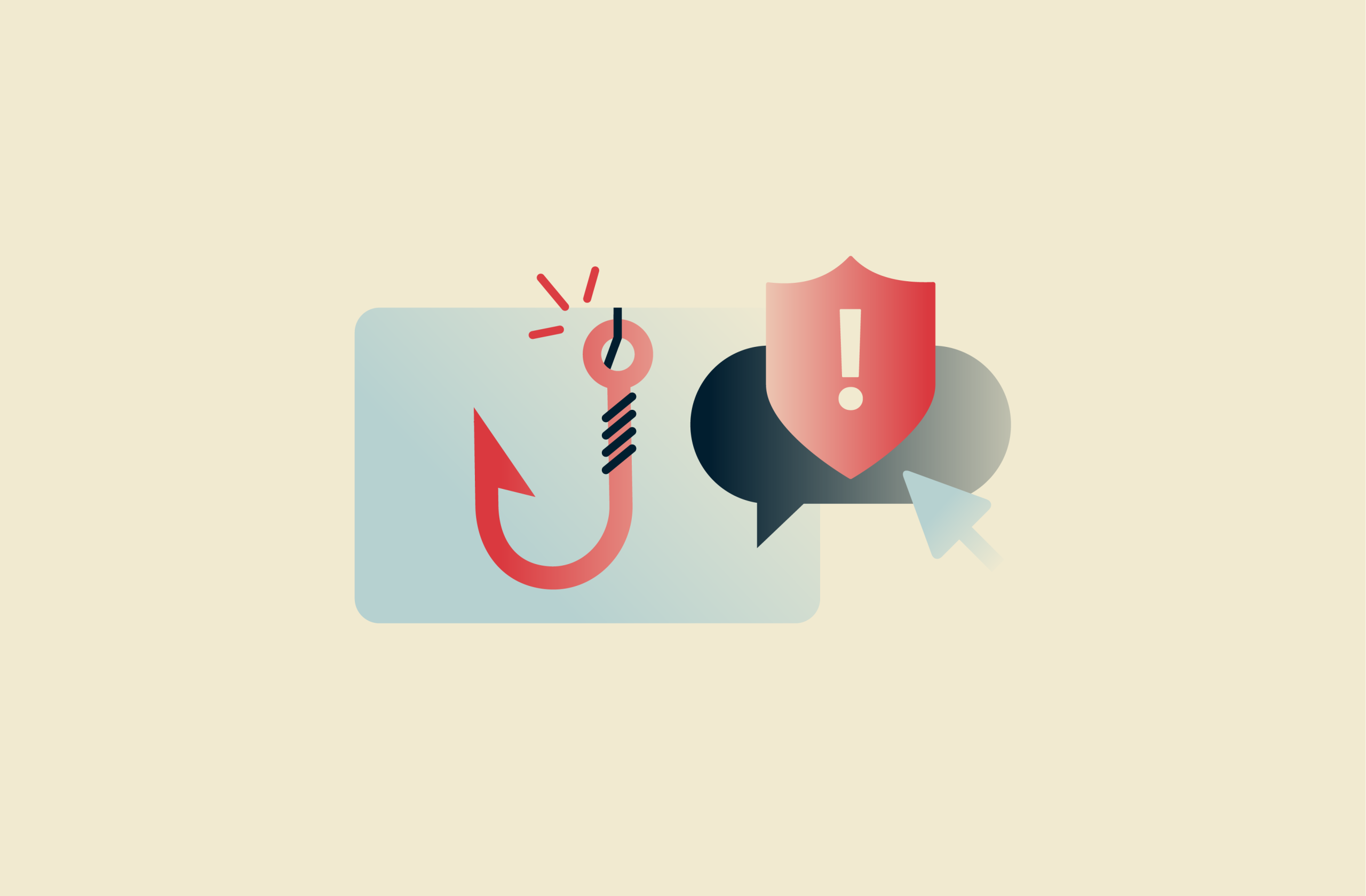
If you receive a phishing message, it’s important not to follow any links, download attachments, or otherwise interact with it. Clicking a link could send you to a malicious website designed to steal personal information or install malware on your device.
The best thing to do in this situation is to report the phishing attempt to the appropriate party. That may be your email provider, the company being impersonated, or your national cybercrime or consumer protection agency. Reporting helps investigators shut down fraudulent domains, disrupt phishing campaigns, and protect others from similar scams.
This guide explains where and how to report phishing emails, texts, calls, websites, and brand impersonation. It also covers what to do if you’ve accidentally clicked on a phishing link and how you can guard against phishing attacks in the future.
How to report phishing emails
Phishing emails remain one of the most common forms of online fraud. While most major email providers have spam and phishing filters, no system is perfect. Some phishing emails can still evade detection and reach your inbox.
For this reason, many email providers include built-in tools that allow you to report phishing directly from your inbox. Below, you’ll find step-by-step instructions for reporting a phishing email in Gmail, Outlook, and Apple Mail.
Report phishing in Gmail
In Gmail, you can report a suspicious message directly from your inbox:
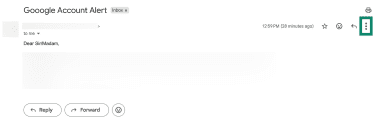
- Open the suspicious email and click the three vertical dots next to the Reply button.
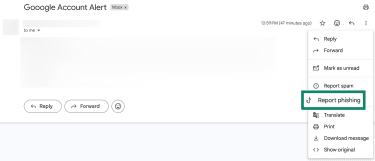
- Choose Report phishing.
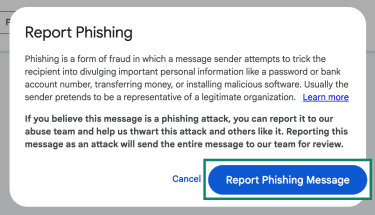
- A pop-up will appear; click Report Phishing Message.
Report phishing in Outlook
Outlook also has a built-in tool to report phishing:
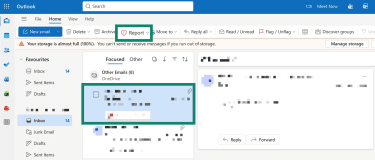
- In your inbox, select the phishing message and click the Report button on the toolbar.
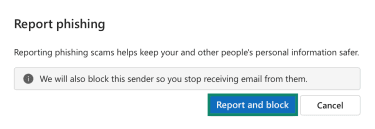
- A pop-up will appear; click Report and Block.
Report phishing in Apple Mail
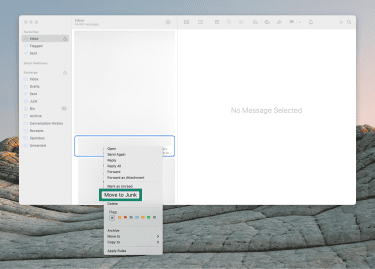
Unlike Gmail and Outlook, Apple Mail doesn’t offer a specific option for reporting a phishing message. All you can do is report a message as “Junk.” This tells the Mail app to redirect any new messages from the sender into your Junk folder. If you’re using iCloud Mail, the sender will also be logged with the provider’s filters.
Here’s how to report a message as “Junk” in Apple Mail:
- In your inbox, right-click on the phishing email and select Move to Junk.
How to report phishing texts and calls
Phishing occurs most often through emails, but scammers do use other mediums. There’s SMS-based phishing, which is called smishing. There’s also vishing, which refers to a phishing attack that involves a phone call or voicemail.
Below, you’ll find step-by-step instructions for reporting smishing and vishing attempts.
Some providers also let you forward unwanted or scam text messages to 7726 (which spells “SPAM” on the keypad). This service is supported by many carriers in the U.S., the U.K., Canada, and Ireland. However, some companies and countries use different codes, so it’s a good idea to check yours directly with your mobile provider.
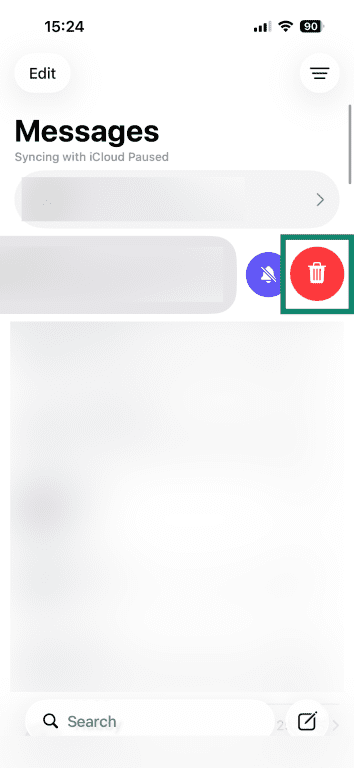
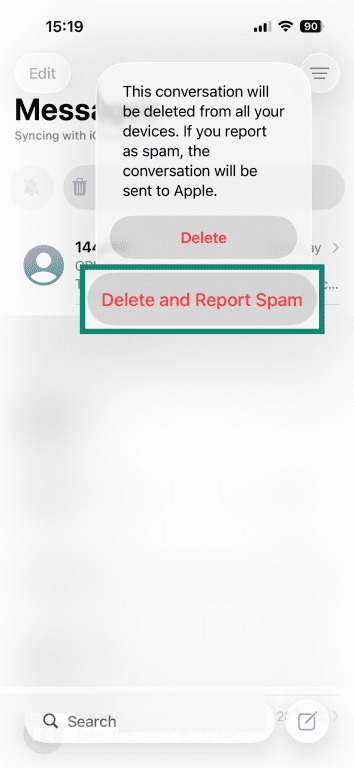
Report smishing on iPhone
- In Messages, swipe left on the message and tap the Delete icon.
- In the pop-up, click Delete and Report Spam.
Report smishing on Android
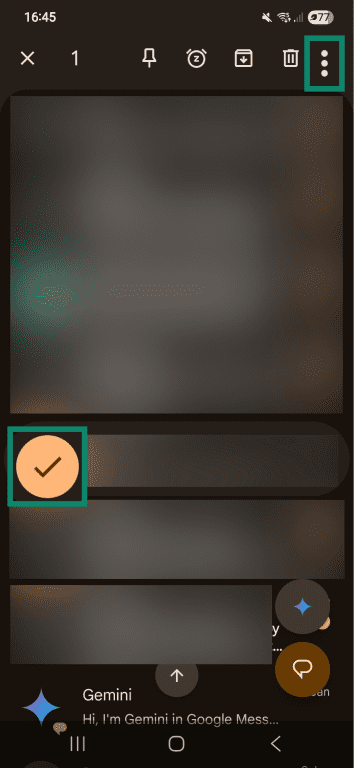
To report smishing on Google Messages:
- Long-press on the conversation you want to report and tap the three vertical dots at the top-right of your inbox.
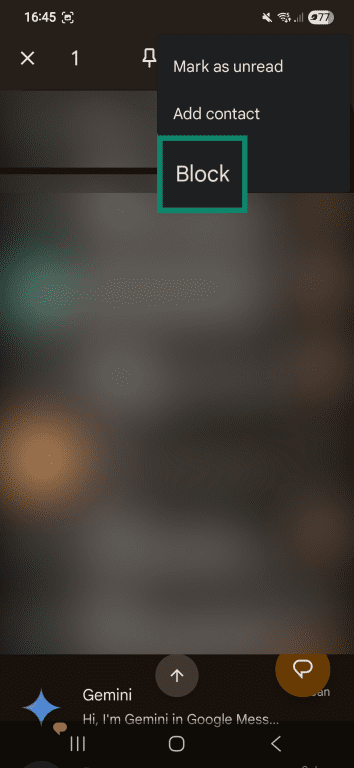
- In the drop-down menu, tap Block.
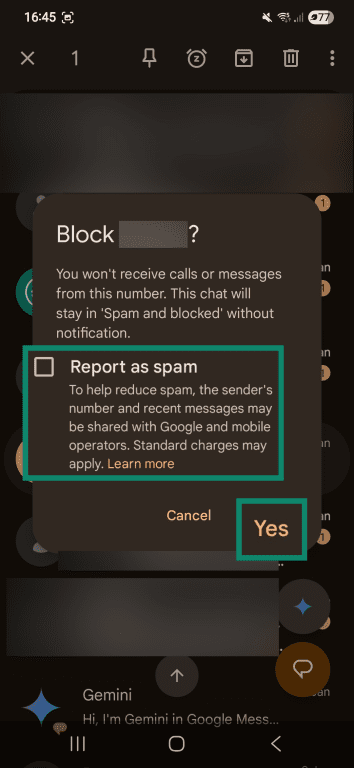
- In the pop-up, check the box for Report as spam, then tap Yes.
Report vishing phone scams
Vishing attempts should be reported to the appropriate authorities, typically your national cybercrime or consumer protection agency.
How to report phishing websites
Phishing websites are malicious sites designed to trick visitors into entering personal information like login credentials or financial information. They’re often linked from phishing emails or text messages, but they can also appear in search results, online ads, and social media posts.
Reporting phishing websites to Google and Microsoft helps limit the spread of these threats. Both companies operate widely used browsing and security services that can block or warn users about malicious sites:
- Google runs Google Safe Browsing, which provides security warnings in browsers such as Google Chrome, Mozilla Firefox, and Apple Safari. Reports can lead to warning pages, search result removal, or reduced visibility for fraudulent sites.
- Microsoft operates Microsoft Defender SmartScreen, which protects users in Microsoft Edge and across Windows systems. Reports can result in similar blocking and warning protections.
Report a fake site to Google
You can report a fraudulent website using Google’s online report form.
Report a fake site to Microsoft
You can report a fraudulent website using Microsoft’s online report form.
Where to report brand impersonation
If a phishing message is impersonating a brand, report it directly to the organization that’s being impersonated. You can check the relevant company’s official website for instructions on how to report phishing or abuse, but here’s a guide for some major brands.
Report phishing to Amazon
Send the suspicious message as an attachment to Amazon at reportascam@amazon.com.
Report phishing to PayPal
Forward the message to phishing@paypal.com.
Report phishing to FedEx
Forward the message to abuse@fedex.com.
Report phishing to Walmart
Send phishing emails to Walmart as an attachment at OnlineAbuse@walmart.com.
Report phishing to Apple
Forward phishing emails to reportphishing@apple.com. To report smishing, you can take a screenshot of the message and send it to the same address.
Report phishing to Microsoft
Report phishing to Microsoft using its online form.
Report phishing to the authorities
In addition to reporting a phishing attempt to your email provider, mobile carrier, or the impersonated brand, you can also report it to the appropriate authorities in your country.
In the U.S., phishing can be reported to the Federal Trade Commission (FTC) through its official reporting website, ReportFraud.ftc.gov. You can also file a complaint with the FBI’s Internet Crime Complaint Center (IC3).
Why reporting phishing matters
When you report a suspicious message, you provide valuable information that helps organizations and investigators stop this type of crime.
For example, your report may allow them to disable harmful links, shut down fake accounts or websites, update spam and anti-phishing filters, or alert other customers to ongoing phishing campaigns.
If you clicked a phishing link
If you accidentally clicked on a link in a phishing message before realizing the danger, it's important to take action right away to reduce potential harm. Visiting a compromised website can expose your personal information or lead to a malware infection.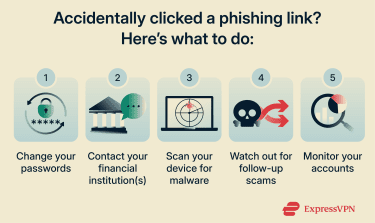
Change passwords and enable MFA
Update your passwords for all accounts that could be affected. Start with your email, because anyone who can access it may be able to log into other accounts tied to that email. Then turn on two-factor authentication (2FA) or multi-factor authentication (MFA) wherever possible. This makes it harder for attackers to access your accounts even if they’ve got your password.
Contact your bank or card issuer
If you’ve entered financial information on a fraudulent site, notify your bank or card provider. They can watch for suspicious activity, freeze compromised accounts, or issue you a new card.
Scan your device for malware
Install a trusted antivirus program on your device and run a full scan. These tools are designed to detect malicious programs and remove them.
Watch for follow-up scams
After clicking a phishing link, scammers may try to contact you again with new deceptive offers.
They may pose as recovery specialists, technical support, or even law enforcement, claiming they can help you recover lost money or secure your accounts. But their real goal is to extract more personal information or payments from you.
Treat any unsolicited messages with caution, especially if the person promises help in exchange for payment, remote access to your device, or sensitive data.
Monitor your accounts
Regularly check your online accounts, bank statements, and credit reports for unusual activity so you can respond quickly if something suspicious occurs.
Consider enrolling in a credit monitoring or dark web monitoring service, which can alert you if your email address, passwords, or other personal information appear in known data breaches or are being traded online.
How to prevent future phishing
Here are some proactive measures you can take to protect yourself from phishing attacks:
- Never click on links or open attachments in suspicious messages. If you’re unsure, verify the legitimacy of the message through a different channel (e.g., by emailing the relevant company directly).
- Educate yourself on common phishing tactics.
- Learn how to identify if a website is safe.
Businesses should also consider:
- Providing regular awareness training so employees can recognize phishing messages and know how to report them internally.
- Deploying filtering services to scan and block phishing messages before they reach user inboxes.
- Setting up email authentication standards like Sender Policy Framework (SPF), DomainKeys Identified Mail (DKIM), and Domain-based Message Authentication Reporting and Conformance (DMARC). These make it harder for attackers to spoof your organization’s address.
- Running simulated phishing exercises or assessments to evaluate how well your systems and people respond to phishing attempts.
FAQ: Common questions about reporting phishing
Where should I report phishing?
You should report phishing to the company being impersonated, your email or phone provider, and/or any appropriate authorities (e.g., the national cybercrime or consumer protection agency).
Should I forward a phishing email?
Different organizations have different procedures for reporting phishing. Some, like PayPal and FedEx, ask you to forward the message to them. Others, like Amazon and Walmart, ask you to send them the message as an attachment.
How do I report phishing on my phone?
Phishing on iPhones and Android devices can be reported through their respective messaging apps. In the U.S., you can forward the message to 7726, or report it to the Federal Trade Commission (FTC) or the FBI’s Internet Crime Complaint Center (IC3).
What if the email looks real?
If you have any suspicions at all, it’s best to verify an email’s legitimacy through an official channel, like the organization’s website or customer support. Don’t click links, download attachments, or provide any personal information unless you’re absolutely sure it’s real.
If you’ve already interacted with the email, take immediate steps to protect yourself, such as changing your passwords, contacting your financial institutions, and scanning your device for malware.
What if I entered my password?
If you entered your password into a phishing site, change it immediately on the affected account and any other accounts that use the same password. Then, if possible, enable two-factor authentication (2FA) or multi-factor authentication (MFA) for an extra layer of security. Finally, you’ll want to monitor your accounts for unusual activity.
How can I tell a website is fake?
There are many ways to tell if a website is fake. For example, a fake website might have a different URL than the official page (e.g., examp1e.com rather than example.com). It might also lack a valid security certificate or have unusual design inconsistencies.
Avoid falling victim to phishing by educating yourself on common phishing red flags like these.
Can I recover money after phishing?
There’s no guarantee, but the chances are higher if you report the fraud to your bank and the platform where you were defrauded immediately. In some cases, they might be able to stop or reverse the transaction.
Take the first step to protect yourself online. Try ExpressVPN risk-free.
Get ExpressVPN