What is cross-site scripting (XSS) and how it works



Cross-site scripting (XSS) is a common web security vulnerability. Instead of breaking into a server directly, an attacker exploits the way a site handles user input, causing the browser to execute untrusted content as if it came from the site itself.
Because modern websites rely heavily on dynamic content, even small mistakes in how input is processed or displayed can create opportunities for this kind of abuse. This guide explores how this vulnerability works, the types that exist, why it’s dangerous, and how developers can reduce the risk of an attack.
What is XSS?
XSS is a security vulnerability in web applications that allows untrusted user-controlled data to be delivered to users as if it were part of the legitimate website. The app essentially fails to properly separate user input from its own content.
Because the browser trusts the website, it can’t distinguish this injected content from the site’s own content. As a result, the attacker’s content may be granted the same level of trust and access as the website itself, which could lead to data exposure, account compromise, or user manipulation.
Why cross-site scripting is dangerous
XSS attacks are dangerous for several reasons:
- Executes in a trusted context: Because the code runs within the affected website, it may inherit that site’s permissions and access to user data.
- Targets users rather than infrastructure: Instead of attacking servers directly, XSS focuses on the browser, which can make the effects less visible at the network level.
- Scalable: If a vulnerability exists in a widely used page or component, multiple users may be exposed before the issue is discovered and fixed.
How XSS attacks work
XSS attacks typically involve two phases. In the first stage, the attacker identifies a target and plants their malicious input into the web app or site they want to target. The second stage involves the victim loading the infected page that the website hasn’t handled safely, which causes the browser to process the attacker-provided content under the site’s trust.
Types of XSS attacks
XSS attacks fall into three main categories, depending on where the malicious input is processed and how it is delivered to users.
Stored (persistent) XSS
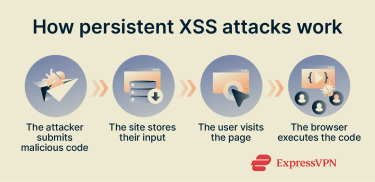 Stored or persistent XSS attacks occur when the web application saves the malicious input and displays it to users who visit that page in the future. In this case, the malicious content lives on the server, often in a database. Every user who views the affected page receives the attacker’s content automatically.
These XSS attacks can have a broad impact, as a single injection can affect a large number of users in a short amount of time. Typically, they involve the attacker submitting their code as a comment, a post, in their user profile, or as some other form of user-submitted content.
Reflected (non-persistent) XSS
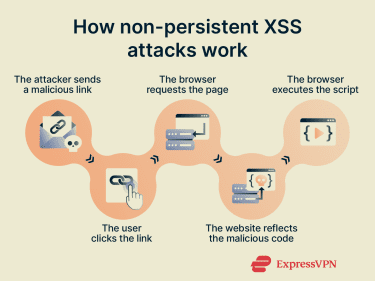 Reflected, or non-persistent, XSS attacks happen when malicious input is sent to a website and immediately included in the page it returns to the user. Unlike stored XSS, the input isn’t on the server and only exists for the duration of the request.
These attacks usually involve a link or request that contains attacker-controlled input. When a victim sends the request, the website reflects that input back in the response without handling it safely. As soon as the page loads, the browser processes the reflected content as part of the page.
Reflected XSS typically targets individual users and may rely on phishing or social engineering to get victims to load the crafted request.
DOM-based XSS
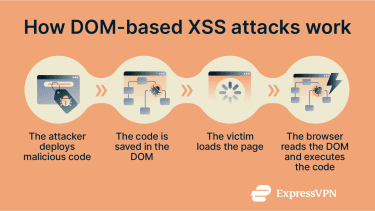 Document Object Model (DOM)-based XSS attacks occur entirely in the user’s browser because the vulnerability exists in the page’s client-side code, not in the server’s response. The page’s own scripts read user-controlled data and insert it into the page without handling it safely.
In a DOM-based XSS attack, the server delivers a normal page, but the page’s own script takes user-controlled data, such as data from the URL or browser storage, and writes it directly into the DOM without handling it safely. The attacker does not inject content through the server. Once that attacker-controlled data is written into the DOM, the browser treats it as legitimate page content.
What can hackers do with an XSS attack?
Once an attacker can execute code in a user’s browser through an XSS vulnerability, they can directly interact with the user’s session and the page as the user sees it. This can allow them to:
Steal session cookies and login data
XSS may allow attackers to access session-related data stored in the browser, such as session cookies used to keep users logged in. If an attacker obtains this information, they could impersonate the user without needing a username or password.
In some cases, attackers can also capture sensitive data directly from the page itself, such as credentials entered into forms. This can enable them to bypass additional protections, including mechanisms like two-factor authentication (2FA), because the attack occurs after the user has already authenticated.
Hijack user sessions
Attackers can use XSS to take control of an active user session and perform actions on their behalf directly through the browser. This may include modifying account settings, accessing private information, posting content, or initiating transactions using saved payment methods. From the application’s perspective, these actions appear to be performed by the legitimate user, making them difficult to detect.
Inject malicious scripts
By exploiting XSS vulnerabilities, attackers can introduce their own scripts into pages served by trusted websites. These scripts may alter page content, interfere with forms, observe user interactions, or modify application behavior without the user’s awareness. This is one way that XSS could be used as an entry point for additional malicious activity, including user surveillance or staged delivery of more harmful content.
Redirect users to malicious websites
Some forms of XSS attacks also involve sending users to dangerous websites via redirects. These redirects may occur immediately or only after certain interactions, which can make them difficult to notice.
The victims might end up on a page that looks legitimate, like a login page for a trusted website, but is actually controlled by the attacker. Any information they submit on these fake sites will go directly to the attacker, and cybercriminals can also use these sites to deliver malware, display malvertising, or carry out various other types of scams.
Real-world examples of XSS attacks
Here are some examples of high-profile XSS attacks over the years, reported by the media and security researchers, including:
- Malicious content injected into marketplace listings: Researchers have observed XSS vulnerabilities in online marketplaces where attackers reportedly injected malicious scripts into user-generated content. When visitors viewed the affected pages, they were redirected to phishing sites, likely designed to steal login credentials and payment information.
- Compromised payment and checkout pages: Investigations showed attackers injecting malicious JavaScript into online checkout pages, where it captured payment card details as customers entered them during transactions. The stolen data included card numbers, expiration dates, and security codes, which were transmitted to attacker-controlled servers in real time.
- Email-based XSS attacks: A researcher discovered and responsibly disclosed a stored XSS vulnerability in a popular webmail service that could have allowed attackers to embed malicious JavaScript in specially crafted email messages. When a user opened such a message, the code would have run automatically, potentially exposing account data, modifying settings, or forwarding email without the user’s consent.
How to prevent XSS attacks
Preventing XSS comes down to how a web application handles user-controlled data at every stage, from the moment it is received to the moment it is rendered in the browser. The following measures address the most common points where XSS vulnerabilities are introduced and form the foundation of effective XSS defense.
Input validation and sanitization
Input validation checks that user-submitted input, like comments or message board posts, matches the application’s expectations. This helps to prevent malformed or unwanted data from entering the system. Sanitization goes further, modifying any suspicious or potentially risky input to remove problematic elements, like automatically deleting links from user comments, for instance.
Output encoding
The main reason XSS attacks happen is that sites mistake user-controlled data for code instead of plain text. Output encoding aims to fix that and is widely regarded as one of the most effective lines of defense against XSS exploits. It works to essentially display all user data in the form of text, minimizing the risk of browsers inadvertently running dangerous scripts. So even if an attacker posts malicious code, it’s less likely to trigger when visitors visit the page.
Content security policy (CSP)
A CSP is a browser-level safety mechanism that essentially controls how webpages work and what code or scripts they’re allowed to execute. They allow site admins to control which domains can run scripts and which ones can’t, as well as whether or not dynamically-generated code is allowed to execute. In other words, CSPs can limit which scripts are allowed to execute, reducing the impact of certain XSS vulnerabilities.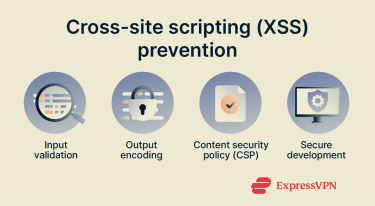
Secure development practices
To minimize the risks of XSS attacks, designers and developers should practice secure development practices, like using modern, security-oriented frameworks and avoiding dangerous or outdated APIs. This helps to ensure that their sites and web apps are as safe as possible at the moment of launch, with the lowest risks of XSS exploits or other security concerns.
How users can reduce the risk of XSS attacks
XSS is a site-side problem, and it’s largely up to site owners and developers to address it. With that said, everyday users can still minimize their risks of exposure to XSS attacks by:
- Being wary about clicking links or opening suspicious messages.
- Examining links posted by other users closely before clicking them, or simply not clicking them at all.
- Using security extensions or script-blocking tools.
How to detect and test for XSS vulnerabilities
Detecting and testing for XSS vulnerabilities once again falls largely onto site owners and admins, rather than everyday users. It can involve a mixture of automated tools and manual methods, and the most effective approaches typically involve numerous techniques, rather than relying on any single one.
Manual testing methods
Manual testing involves site owners and developers checking how their sites and web applications respond to and manage user-inputted text or content, and how that content is then reflected back to browsers.
This might involve:
- Reviewing user-controlled input points on the site.
- Submitting data and monitoring where and how it appears on the updated page.
- Verifying whether or not the app treats input as plain text.
These methods can be time-consuming and demand high levels of technical expertise and experience, but they may help spot weaknesses that automated tools might overlook.
Automated XSS testing tools
Automated tools are software applications that can scan sites for XSS vulnerabilities, reducing the need for manual oversight or input. They can work in various ways, but often revolve around analyzing how input is managed by a site or app. They’re able to then spot instances where sites fail to treat input as plain text, for example, and alert owners or admins about XSS issues.
Common challenges in XSS detection
Even with both automated and manual techniques, XSS can be difficult to detect and resolve due to a range of factors, such as:
- Limitations: Even advanced detection tools are limited in what they can detect, as some vulnerabilities may only appear in specific circumstances.
- Specificity: In some cases, built-in app protections may block many kinds of attempted attacks, but may still be vulnerable to very specific or edge cases.
- Complexity: Web applications often have complex designs, with dynamically-generated content and multiple layers, making weaknesses challenging to discern.
FAQ: Common questions about cross-site scripting (XSS)
What’s the difference between XSS and SQL injection?
Cross-site scripting (XSS) attacks and Structured Query Language (SQL) injections are both common web security issues, but they work in different ways. XSS attacks users by running malicious code in their browsers, while SQL injection targets databases by manipulating queries sent to them by servers.
How serious is an XSS vulnerability?
Cross-site scripting (XSS) vulnerabilities can be serious, as they can allow attackers to inject dangerous scripts into sites that are widely trusted, potentially leading to malware infections and data theft. There have been several real-world cases of XSS attacks affecting major organizations.
How do WAFs help against cross-site scripting (XSS)?
Web application firewalls (WAFs) essentially act as shields for web apps. They monitor incoming traffic and use other methods, like behavioral analysis, to spot signs of suspicious activity, like malicious scripts. WAFs can then automatically block harmful requests before they reach the application, helping prevent XSS attacks.
Can XSS affect website visitors or only site owners?
Cross-site scripting (XSS) can affect both website visitors and site owners, with visitors typically being the main targets and victims of XSS attacks. Attackers inject malicious code into websites, which then runs in visitors’ browsers, potentially putting them at risk of data theft, session hijacking, or malware infections.
Take the first step to protect yourself online. Try ExpressVPN risk-free.
Get ExpressVPN