How to detect and prevent barrel phishing attacks


Barrel phishing attacks unfold slowly and rely on your attention, your routine, and the moments when you least expect manipulation. Even strong security tools can’t replace your own awareness, especially when someone appears to be part of an ongoing exchange.
This guide breaks down how barrel phishing works in real situations, the risks it creates for both individuals and organizations, and the signs that something is off. You’ll also learn simple habits that help you stay protected while keeping your communication fast and comfortable.
What is barrel phishing?
Barrel phishing, also called double-barrel phishing, is a type of phishing attack that uses a two-step approach. In the first step, attackers build trust with a normal-looking message with the goal of lowering your suspicion and delaying caution. Once that’s done, they deliver the harmful request in the second step. This might be a malicious link, an infected file, or a request for sensitive information.
Barrel phishing vs. traditional phishing attacks
Traditional phishing attacks rely on volume. Attackers send thousands of generic emails hoping that at least a few people will click without thinking. These messages often feel rushed, suspicious, or unrelated to anything you’re doing.
Barrel phishing usually focuses on a smaller number of targets and uses a slower approach that feels personal. Because the attacker has already warmed up the conversation, the harmful follow up message feels more believable.
Why it’s more dangerous than you think
Barrel phishing’s danger comes from making the scam feel like a normal conversation rather than an obvious attack. Its design makes it more likely to slip past your instincts and even basic security tools because the first message contains nothing suspicious. By the time the harmful follow up arrives, you may not feel the need to double check it. That increases the chance of clicking a link, sharing sensitive details, or downloading something unsafe.
This risk grows further as AI and large language models (LLMs) become more advanced. These tools can generate natural, human-like messages at scale, making barrel phishing attempts harder to spot and more convincing than ever.
How does a barrel phishing attack work?
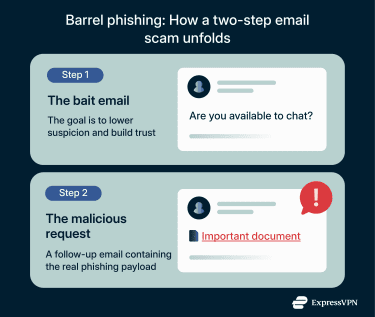
A barrel phishing attack typically follows a simple pattern as seen below.
Step 1: The initial email that builds trust
The attack starts with one or more harmless messages that are typically very easy to respond to. These emails don’t contain links, attachments, or threats because they’re simply there to establish familiarity. The attacker wants you to think you’re having a legitimate conversation or receiving a normal business message. The first message can look like:
- A casual work-related question.
- A reply to a thread you already trust.
- A vague request that seems non-urgent.
Step 2: The follow-up email that carries the payload
After trust is established, the attacker follows up with a second message that does contain something harmful. For example, it may:
- Ask you to click a link or scan a code.
- Request sensitive information or approval.
- Include a file or redirect to a login page.
- Rely on the earlier exchange to feel legitimate.
How attackers hijack an email thread or create context
Barrel phishing relies on the attacker’s ability to send messages that appear to come from a trusted source or belong to an existing conversation. They usually achieve this through account compromise accounts, which lets attackers insert themselves into ongoing conversations without creating a new suspicious message.
Attackers often gain access to a real email account, such as a vendor, colleague, or service provider, through prior phishing or stolen credentials. After gaining access, attackers review existing conversations and reply directly within active email threads, a technique known as thread hijacking. These replies come from legitimate accounts, carry familiar subject lines, and match prior discussion. As a result, recipients see the message as a natural continuation of the conversation rather than a new or suspicious email.
Social engineering tactics used
Barrel phishing is a form of social engineering that relies on subtle psychological tricks rather than obvious threats. To make their messages feel legitimate, attackers usually rely on a mix of the following tactics:
- Trust and rapport: The first message is harmless and designed to feel routine and lower your guard before the real threat appears.
- Urgency: Follow-up messages may create pressure by suggesting something needs immediate attention, pushing you to act without stopping to think.
- Authority: Attackers often pose as senior staff or IT personnel, relying on your instinct to comply with requests from people in charge.
- Helpfulness: Some messages ask for a quick favor or simple task, exploiting your willingness to be helpful and cooperative.
Is barrel phishing the same as spear phishing?
Barrel phishing and spear phishing describe different dimensions of an attack. Spear phishing is defined by targeting. It refers to phishing attacks aimed at a specific person, role, or organization using tailored information. The message may be a single email or part of a short exchange, but personalization is the defining characteristic.
Barrel phishing defines how the payload is delivered. A barrel phishing attack can be a targeted spear phishing attack or untargeted attack, and a spear phishing attack can use many delivery techniques, one of which is barrel phishing.
Recognizing the signs of barrel phishing
You can recognize barrel phishing by paying attention to small cues that suggest an email exchange isn’t as natural as it seems.
Red flags to watch for
Red flags in barrel phishing emails often appear as small inconsistencies or unusual requests. Paying attention to these signs can help you spot a potential scam before it causes harm. Some common warning signs include:
- Unexpected emails: If an email comes out of nowhere trying to start a normal conversation, pause and consider whether it makes sense.
- Suspicious sender addresses: Messages from addresses that differ slightly from official company domains can indicate a scam.
- Vague details: Legitimate emails usually provide clear context, while suspicious ones stay intentionally vague.
- Requests for money or sensitive info: Emails asking for payments, account details, or other private data are high risk.
- Out of place requests: If a message doesn’t match your usual tasks, double check before responding.
Real examples of barrel phishing emails
A common example begins with a simple greeting like “Are you available?” or “Quick question” sent to an employee or manager. The message looks normal because many workplaces use short emails like these. The second email then asks for something unusual, such as buying gift cards, reviewing a link, or confirming account details.
Another example involves messages pretending to come from human resources with harmless questions followed by a link to a login page. These attacks often use link manipulation, where the web address looks legitimate but includes subtle tricks like Cyrillic letters that redirect you to a fake site.
Common barrel phishing personas used
- The “new” employee: Reaching out for help with internal systems to gain access to confidential data.
- IT support: Providing helpful troubleshooting assistance before requesting a password update.
- The vendor: Checking in on a project before “sending over the final agreement” (the malicious link).
How barrel phishing bypasses basic filters
Barrel phishing often slips through spam filters because the first message contains no harmful links, attachments, or trigger words. Email filters check for known malicious content, so a plain text greeting passes without issue.
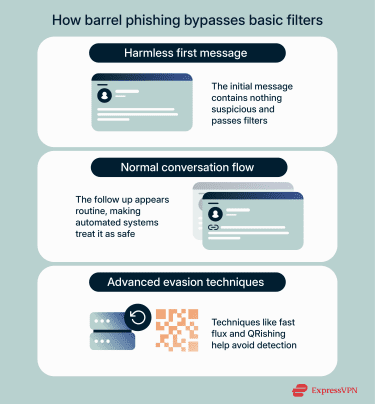
Even the second message can look safe if the link or attachment is new and hasn’t been flagged yet. Since the exchange seems like a normal conversation, automated systems treat it as legitimate communication. In some cases, attackers combine barrel phishing with techniques like fast flux, which rapidly rotates the servers or domains hosting malicious links. They may also hide harmful links or files inside QR codes, further evading detection. These codes can evade email filters, so the threat isn’t always easy to spot.
What should I do if I clicked a phishing link?
If you clicked a phishing link, act immediately to reduce damage. Start with the following:
- Avoid entering personal information: If a phishing link takes you to a fake website, don’t provide passwords, credit card numbers, or your Social Security number. Close the page immediately.
- Stop automatic downloads: Check your browser and downloads folder to make sure no files are running that could infect your device.
- Disconnect from the internet: This can prevent malware from sending your data to attackers.
- Scan for malware: Use specialized tools to detect and remove threats.
- Back up essential files: Save important data, but avoid copying potential malware.
- Update passwords: Change passwords for accounts that may be at risk and consider updating other key accounts.
Consequences of falling for barrel phishing
Falling for a barrel phishing attack can expose both you and your workplace to risks that go far beyond a single bad email. The impact can spread quickly if the attacker uses your trust to reach other people in your network.
Financial and identity theft risks
One of the most common outcomes is financial loss. Attackers may trick you into sending payments, sharing bank details, or approving transactions that look legitimate. They can also collect enough information to impersonate you, which increases the risk of identity theft. These issues take time and effort to fix, especially if sensitive data leaves your control.
Organization-level breaches
In a workplace, barrel phishing can lead to serious security incidents. If an attacker gains access to internal systems, they may reach confidential files, customer data, or communication channels. The result can be service outages, data leaks, and costly investigations.
Regulatory and reputational impact
Data exposure resulting from barrel phishing can trigger regulatory obligations, including reporting requirements under laws such as the General Data Protection Regulation (GDPR). Beyond compliance issues, organizations may suffer reputational damage if attackers use compromised accounts to target customers or business partners, eroding trust in established communication channels.
How to prevent barrel phishing
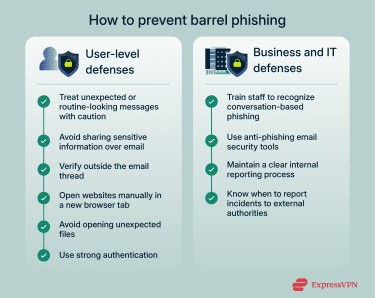
Here are practical steps you can take to protect yourself from barrel phishing attacks, including personal safety habits, better email practices, identity checks, and other methods.
User-level strategies
Start by treating unexpected messages with caution, even if they look polite or routine. If someone starts a conversation you weren’t expecting, take a moment to think about whether the request makes sense. Avoid sharing sensitive information over email unless you were expecting the conversation and you know the sender well.
You can also keep your accounts safer by using strong passwords and turning on phishing-resistant multi-factor authentication (MFA) features like biometric identification. All of this lowers the damage an attacker can cause even if they trick you.
Email best practices
Good email habits make barrel phishing easier to catch. Read messages slowly and look for details that seem off, such as unusual wording or requests that don’t match your normal work.
Avoid clicking links or opening attachments until you know where they came from. If something feels strange, open a new browser tab and visit the website manually instead of relying on a link. Keeping your device and apps updated also helps because many security patches fix vulnerabilities that attackers try to exploit.
Verify sender identity
Verifying the sender is one of the strongest defenses. Check the full email address and not just the display name since attackers often mimic familiar names. If you receive a message that asks for money, personal information, or quick action, confirm it through a second channel.
This can be a phone call, an internal chat, or a face to face conversation if possible. Never rely on the email thread alone. A simple verification step can stop an attack before it even begins.
Business and IT defenses
Businesses can lower the risk of barrel phishing by using a mix of employee training and technical protections. Here are some common strategies they can put in place.
Anti-phishing software
Anti-phishing tools scan incoming messages for patterns linked to fraud. They check sender information, look for unusual behaviour, and score messages based on known risks. Some tools also isolate questionable emails so employees can review them safely.
These systems won't stop every attack, but they reduce the number of dangerous messages that reach inboxes. Using them alongside staff training gives businesses much stronger protection.
DMARC, SPF, DKIM
Email authentication tools such as Domain based Message Authentication Reporting and Conformance (DMARC), Sender Policy Framework (SPF), and DomainKeys Identified Mail (DKIM) help verify whether an email truly comes from the domain it claims to use.
SPF checks which servers are allowed to send messages for a domain. DKIM adds a digital signature so the receiving server can confirm the message wasn’t changed in transit. DMARC brings these checks together and sets rules for how receiving servers should handle failures. These tools make it harder for attackers to spoof company email addresses.
Legal and reporting actions
When a business is targeted, reporting the incident can help limit the damage. Most countries have cybercrime hotlines or government agencies that collect reports and provide guidance.
For example, in the U.S. you can start by contacting the Federal Trade Commission (FTC) and the Internet Crime Complaint Center (IC3). These agencies can provide guidance, resources, and steps to help you recover while contributing to broader efforts against phishing attacks.
Similarly, in the EU, you can contact your national data protection authority or relevant cybercrime unit. Organizations handling personal data may also need to report incidents under the GDPR, which helps coordinate responses and prevent further harm across member states.
FAQ: Common questions about barrel phishing attacks
What are the different types of phishing?
Phishing comes in many forms beyond barrel phishing. Common types include spear phishing, which targets specific individuals with personal details, and whaling, which focuses on high level executives. There is also clone phishing, where attackers copy a legitimate email and replace attachments or links with malicious ones. Each type uses social engineering to manipulate trust and prompt action.
What makes barrel phishing effective?
Barrel phishing works because it builds trust over time. Unlike generic scams, the attacker initiates a small, harmless exchange first, making the follow up request feel routine. It also uses psychological cues, like familiarity and mild urgency, to lower suspicion. This combination increases the likelihood that a recipient will respond without double checking the message.
Can phishing be reported or prosecuted?
Phishing can be reported and in many cases prosecuted. Most countries have cybercrime hotlines or government agencies that handle online fraud. Reporting helps law enforcement track patterns and warn other potential victims.
Companies that handle personal data may also be required to notify regulators under laws like the General Data Protection Regulation (GDPR), and this can trigger investigations or legal action against attackers.
How can businesses defend against phishing?
Businesses defend against phishing through a mix of training and technology. Employee awareness programs teach staff how to spot suspicious emails and verify requests.
Technical measures include anti-phishing software and email authentication tools like Domain based Message Authentication Reporting and Conformance (DMARC), Sender Policy Framework (SPF), and DomainKeys Identified Mail (DKIM).
Combining these strategies and technologies reduces the likelihood of a successful attack and helps contain incidents when they occur.
Take the first step to protect yourself online. Try ExpressVPN risk-free.
Get ExpressVPN