Your cybersecurity guide to attack surface management (ASM)



Traditional security assessments often focus on defending known assets and responding to detected threats. However, as an organization’s attack surface expands, these periodic practices may no longer suffice. Enter attack surface management (ASM), a proactive approach that aims to identify unknown assets and vulnerabilities before they become potential entry points for cyberattacks.
This guide walks you through what ASM is, why it matters, how teams run it day to day, and what tool features to look for.
What is ASM?
ASM is the ongoing process of identifying assets, mapping connections between them, spotting vulnerabilities, and resolving issues. Its goal is to find gaps before attackers do.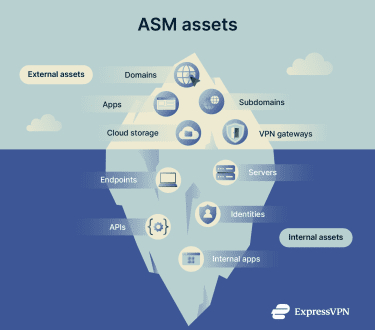
Understanding attack surface
Attack surface is the set of entry points an attacker could exploit in an organization’s system. It can be digital (websites, outdated software, applications), physical (laptops, mobile devices), or human (access requests, messages). It includes systems you own, systems partners run for you, and risks inherited from cloud sprawl or shadow IT.
Why does ASM matter?
- Attack surfaces grow as organizations add cloud services, remote access, Software-as-a-Service (SaaS), APIs, and vendor integrations.
- Organizations need comprehensive visibility into assets, including hidden ones like shadow IT.
- Security teams often encounter a significant volume of vulnerabilities, and they need to prioritize the most critical ones.
- Digital environments evolve daily and exposures may arise suddenly.
- External vendors and third-party services may introduce hidden risks.
- Regulatory and security compliance frameworks require accurate, up-to-date asset inventories.
- Key performance indicators (KPIs) and benchmarks are essential for tracking progress and security.
ASM can help address these security challenges and close inventory gaps, reducing the likelihood that attackers will find and exploit them as entry points for cyberattacks.
How does ASM work?
The ASM lifecycle consists of eight main stages: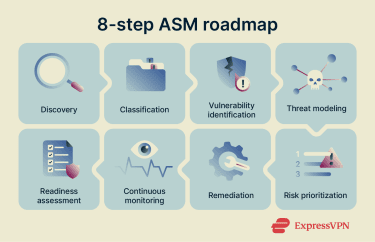
1. Asset discovery
Asset discovery aims to find all known, unknown, and third-party digital assets across the environment. It builds your baseline by:
- Defining asset types like domains, apps, and cloud endpoints.
- Mapping asset ownership based on proof like domain registration data and cloud tags.
- Connecting assets to customer-facing devices, Domain Name System (DNS) records, certificates, and ports.
Most teams do it from two directions: external and internal. External asset discovery starts with assets visible to the public internet, such as websites, customer portals, subdomains, public cloud storage, and Secure Sockets Layer (SSL) certificates.
Internal asset discovery pulls asset and inventory data from systems you manage, such as endpoint detection and response (EDR), mobile device management, cloud inventories, and single sign-on (SSO) directories. Internal assets often include user accounts, databases, and devices used.
2. Classification
Classification tells you what each asset is and why it matters. The process involves:
- Labeling assets with metadata (e.g., lifecycle stage, ownership) to reveal their business context.
- Identifying an asset’s exposure level (external vs. internal assets), function (customer app vs. test server), and data sensitivity.
- Assigning asset ownership so that remediation tasks are sent to the correct departments and owners.
3. Vulnerability identification
Vulnerability discovery assesses the identified assets to find weaknesses such as security misconfigurations, software flaws, and identity risks. Detection techniques include:
- Vulnerability scanning for known software issues.
- Identity and configuration security checks.
- Web app testing for common app flaws.
- Secret scanning using tools like GitLab and GitHub’s built-in scanners to detect exposed keys and tokens.
Scanning for vulnerabilities also covers both external and internal environments. External scanning helps you find what attackers see: exposed ports, outdated services, SSL certificate misconfigurations, and forgotten subdomains.
Internal scanning helps you identify what attackers might exploit once they gain access: weak local admin settings, unpatched servers, risky lateral movement paths, and misconfigured identity permissions.
4. Threat modeling
Threat modeling filters a long list of identified assets and vulnerabilities into a focused list of realistic attack paths an attacker could follow. It helps you answer “How can each asset be compromised?”
The steps in a practical threat modeling workflow include:
- Drawing the data flow between users, apps, APIs, data stores, and trust boundaries.
- Listing entry points, such as login pages, APIs, third-party integrations, admin interfaces, and continuous integration and continuous delivery (CI/CD) pipelines.
- Mapping plausible attacker actions, such as spoofing identity, tampering with data, exposing data, denying service, and escalating privileges.
- Selecting verifiable technical controls that break the attack path (e.g., multi-factor authentication (MFA) breaking the spoofing path).
Threat modeling focuses on high-impact services that often hold sensitive data and critical business functions, like admin portals, data stores, and remote access gateways.
5. Risk prioritization
Risk prioritization tells you what to fix first based on threat model insights. It ranks findings based on factors like:
- Exploitability: Can an attacker actually reach this vulnerability from the outside (internet)?
- Business impact: If this vulnerability is compromised, will business operations stop or will data leak?
- Blast radius: Does this asset open access to critical systems?
External scores are useful inputs, but your business context decides the urgency. Effective risk prioritization addresses confirmed internet-facing (external) exploits immediately, followed by high-likelihood external risks and critical internal identity systems. Lower-priority issues for low-risk assets are best handled during scheduled maintenance.
6. Remediation
Remediation involves patching, reconfiguring, or removing unsecured assets. Its lifecycle often involves the following elements:
- Routing tasks to owners based on pre-defined metadata to ensure every task has a specific team accountable for the fix.
- Establishing workflows for triaging, assigning, and tracking tasks.
- Verifying fixes to confirm the resolution and document the risk reduction.
- Aligning deadlines with risk levels to ensure critical exposures are prioritized over lower-priority issues.
7. Continuous attack surface monitoring
Unlike traditional security assessments that rely on annual tests or quarterly scans, attack surface monitoring operates 24/7 to catch new risks. It tracks new and unknown assets, changes in settings, new vulnerabilities, and unusual activity.
Monitoring in ASM follows a dynamic model that detects changes as they occur to trigger follow-up assessments. Operational monitoring activities may include:
- Running checks on every infrastructure change, such as Infrastructure-as-Code (IaC) merges.
- Running external scans after DNS changes and certificate issuance.
- Sending alerts when a cloud resource flips from private to public.
- Reviewing high-risk findings each week with the teams that can fix them.
8. Assessing organizational readiness
The ASM process is a continuous loop. After remediation and monitoring, the cycle feeds back into readiness assessment to better prepare for future threats. The typical capability areas to check before restarting or scaling the ASM process are:
- Inventory maturity: Do you have a live view of endpoints, cloud resources, SaaS, and internet-facing assets with owners?
- Identity baseline: Do you enforce strong authentication, review permissions, and track risky access paths?
- Change control: Can you route remediation work into the same process teams already follow?
- Scan authority and legal guardrails: Do you have written permission to scan your own assets and third-party hosted services?
- Skills and staffing: Do you have people who can interpret findings and help teams fix them?
- Metrics: Do you track exposure growth, time-to-fix, and repeat offenders?
What are the benefits of ASM?
These are the benefits teams typically get once inventory, ownership, and remediation workflows are in place: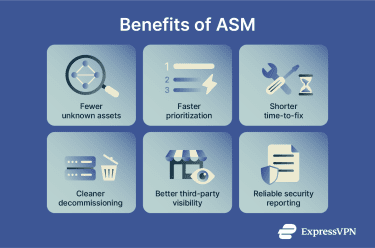
- Fewer unknown internet-facing assets: ASM surfaces domains, subdomains, cloud endpoints, and services that teams set up and forget. This reduces the number of surprise entry points.
- Faster prioritization under real pressure: When a new vulnerability is discovered, teams need to answer two questions fast: “Do we have it?” and “Is it exposed?” ASM helps you find affected assets and rank fixes based on reachability and business impact.
- Shorter time-to-fix via improved routing: Findings are sent to the right owner, with proof and context, inside the same ticketing flow teams already use.
- Cleaner decommissioning: Old hosts, test environments, and unused SaaS accounts often remain online. ASM provides a repeatable process for retiring unused assets and reducing exposure over time.
- Better third-party visibility: Vendor-hosted apps and services still affect your risk. ASM helps you track those dependencies, spot exposures, and push for fixes through the contract owner.
- More reliable security reporting: ASM provides analytics that leaders can use to make strategic decisions and hold teams accountable for their security responsibilities.
Types of attack surface management tools
ASM is a solution and strategy that uses different “views” of the attack surface, depending on the risks they’re trying to control. Many ASM tools combine several types and consolidate them into a single inventory and remediation workflow.
External attack surface management (EASM)
A common form of ASM, EASM focuses on finding risks visible and reachable from the public internet. It looks for assets like web apps, SSL certificates, exposed ports, domains, and subdomains.
EASM is where many teams start, since it mirrors attacker reconnaissance. It’s strongest when it links findings back to ownership and business services.
Cyber asset attack surface management (CAASM)
CAASM focuses on building a trusted inventory of cyber assets by aggregating data from internal tools you already use, such as EDR, cloud platforms, vulnerability scanners, identity providers, and IT asset management tools. It’s less about external asset discovery and more about correlation and policy governance. It helps you answer questions like:
- Do we have one record per asset or several conflicting ones?
- Do we know who owns each asset?
- Can we tie exposures to the right team and track closure?
CAASM often becomes the backbone that connects external findings to internal systems, owners, and workflows.
Digital risk protection services (DRPS)
DRPS looks for risk exposure outside of an organization's control. This includes signals associated with impersonation, fraud, or data exposure. It can also include infrastructure and activity that may be linked to bad actors.
What to look for in an ASM tool
Finding the right ASM tool in the market can be confusing due to the wide range of tool types and capabilities. To narrow down your choices, you can start by defining your organization’s requirements and goals. Here’s a practical checklist:
Discovery and coverage
Look for ASM tools that provide external coverage that identifies domains, subdomains, and shadow IT, while using internal connectors to pull inventories from cloud, endpoint, and SaaS systems. It should also provide clear evidence of ownership to distinguish what is truly yours from what looks like yours.
Asset inventory quality
It’s important to have a single asset record that aggregates data from multiple sources to provide a unified view. This record should track change history to pinpoint when exposure started, while populating owner fields and service ties that flow directly into your tickets and reports.
Risk signals and prioritization
Effective prioritization requires support for vulnerability severity and timely signals of exploit activity. Look for solutions that are able to tag and prioritize high-impact business services, backed by a scoring system that factors in asset attractiveness, business impact, and recoverability.
Workflow and operations
Operations should have tight integration with your existing ticketing and change management systems. The platform should support service-level agreements, retesting, and patch verification, all governed by role-based access controls and detailed audit trails.
Noise control and validation
To maintain trust, the system should have validation steps that reduce false positives and deduplication logic that prevents one issue from spawning several tickets. It should also exhibit safe scanning behavior with clear operational limits.
Reporting and accountability
Check whether the platform offers distinct views tailored for security, IT ops, cloud, and app teams. It should track metrics on exposure growth, fix times, and recurring issues, while offering export and API support for your own reporting needs.
Tip: Pick a tool that fits your environment and maturity. A smaller team may start with EASM and basic asset inventory. A large organization often needs CAASM to correlate cloud, identity, endpoint, and ticketing data.
Best practices for effective ASM
ASM works best when it becomes normal work, not a fire drill. The goal is steady progress: fewer unknown assets, faster ownership, faster fixes, and fewer repeats. The practices below will help you keep momentum without burning out your teams: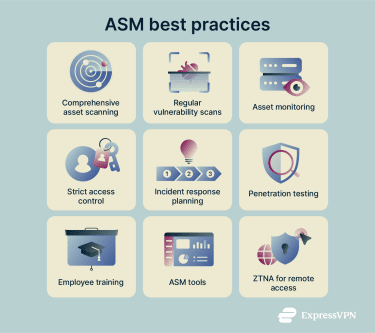
Scan assets in devices, apps, and services
Start by defining what “in scope” means, then make it measurable. A practical coverage approach looks like this:
- Build an asset list from multiple sources (e.g., cloud accounts, identity, endpoint tools, DNS, ticketing).
- Set minimum scanning expectations per asset type.
- Track unmanaged assets as work items, not exceptions. Common blockers include missing ownership, missing credentials, or unclear legal approval for third-party hosted services.
Coverage improves when you link discovery to asset creation. If a team can create a new cloud project or register a domain, security needs a trigger that captures it.
Run regular vulnerability scans
Scanning cadence should match change cadence. Weekly scans can easily miss fast-moving environments. On the other hand, daily scans can drown teams in noise if you don’t validate and deduplicate. To create a balanced schedule that scales:
- Run authenticated scanning for internal systems where possible.
- Run external scans on a schedule, plus after changes to DNS, certificates, or public IP services.
- Use exploit activity signals, like Known Exploited Vulnerabilities (KEV) catalogs, to guide urgency.
Each finding should be tied to evidence, an owner, and a deadline. If “no owner” vulnerabilities are found, they should be prioritized and mapped back to departments and individuals to avoid impeding remediation.
Monitor websites and third-party services
Websites and vendor-hosted tools can expose admin panels, old frameworks, risky plugins, and forgotten subdomains. Add to that third-party services, which can add risk through integrations, exposed portals, or weak authentication settings. To monitor assets effectively, you can:
- Track changes in DNS, certificates, and hosting for your domains.
- Watch for new third-party login pages tied to your brand or SSO.
- Maintain a vendor list tied to business owners, with a path for security notifications and patch coordination.
Control access
Access control is attack surface control. A service behind login can still be high risk if credentials are easy to steal or privileges are too broad. Focus on high-leverage steps:
- Require strong authentication for admin access and remote access.
- Review privileged roles and remove standing access where possible.
- Segment access so one compromised account can’t reach everything.
- Hide management interfaces from the public internet when feasible.
Access control becomes easier when identity is consistent. You can centralize login through SSO where it fits, then monitor for new apps that bypass it.
Create an incident response plan
ASM reduces exposure, but it won’t prevent every incident. An incident response plan provides a path when something slips through the cracks. At a minimum, the plan should cover:
- Who makes decisions and who communicates.
- How to isolate affected systems and accounts.
- How to preserve logs and evidence.
- How to reset credentials and revoke tokens.
- How to coordinate with vendors and legal counsel.
- How to verify remediation, then prevent repeats.
Besides creating a plan, it’s essential to run tabletop exercises that simulate common ASM-driven incidents, like exposed credentials, an exploited internet-facing vulnerability, or a compromised SaaS admin account.
Conduct penetration tests
Penetration tests explore real attack paths and help validate your assumptions about exposure, segmentation, and identity controls. These tests pay off most when you:
- Scope around business services, not just IP ranges, using ASM asset discovery data.
- Include cloud and SaaS paths, not only classic network targets.
- Feed results back into the ASM inventory and remediation workflow.
- Retest fixes, then document closure evidence.
Instead of following a yearly schedule, pen testing based on asset changes can help catch new vulnerabilities more quickly. However, it’s often resource-intensive, so it’s best to reserve it for high-risk launches, major architecture changes, and recurring exposure problems, and leave the continuous discovery and monitoring to automated ASM tools.
Train employees
Staff create part of the attack surface every day through SaaS signups, domain registrations, permission grants, and handling of secrets. Training works best when it targets those actions and gives staff a clear “what to do instead.” It should cover topics such as:
- How to request a new domain, SaaS tool, or cloud project through authorized workflows.
- How developers can avoid accidental commits and rotate keys.
- How to report suspicious logins, authentication requests, and phishing attempts quickly.
Use ASM tools
Manual ASM can break down if your organization has multiple clouds, many SaaS tools, and frequent releases. ASM tools help when they reduce toil and give a stable inventory. A good ASM tool setup can look like this:
- One inventory record per asset.
- Ownership tied to real teams.
- Evidence that supports action.
- Tickets that track fixes through closure.
Use zero-trust network access (ZTNA) for secure remote access
Remote access can expand your attack surface, especially when remote access gateways expose management features or lag on patching. Using ZTNA alongside ASM can help:
- Treat remote access gateways as high-risk assets that you need to track and patch fast.
- Use strong, dynamic authentication, including phishing-resistant MFA.
- Limit what remote access can reach by segmenting internal resources and applying least-privilege access.
FAQ: Common questions about attack surface management (ASM)
What is attack surface management?
Attack surface management (ASM) is an ongoing process that identifies assets, assesses their exposure, identifies weaknesses, and drives fixes. It covers both internet-facing assets and internal systems that could be exploited.
What is the difference between ASM and EASM?
Attack surface management (ASM) is the continuous process of managing exposure across all asset types in an organization’s entire environment. External attack surface management (EASM) focuses only on public-facing assets, such as domains, public IP services, exposed ports, and web apps.
What tools support ASM?
Teams use a mix of tools for aggregating internal asset data from cloud and endpoint systems, finding external exposures, and scanning and remediating vulnerabilities. Dedicated attack surface management (ASM) platforms aim to consolidate these feeds so teams can view assets, exposures, owners, and fix progress in one place.
How often should organizations review their attack surface?
Organizations should review their attack surface on a schedule and on change events. A common pattern is weekly triage for high-risk findings, monthly reporting for exposure trends, and ongoing checks tied to deployments, Domain Name System (DNS) changes, and new cloud resources. The goal is to identify new exposures as soon as they appear.
What are examples of common attack surfaces?
Common attack surfaces include public login pages, remote access gateways, exposed admin panels, APIs, cloud storage endpoints, misconfigured firewall and security group rules, Software-as-a-Service (SaaS) apps tied to your identity system, and leaked credentials or API keys.
How do I know if my attack surface is growing?
If your inventory grows faster than ownership and fixes, your attack surface is growing. It’s important to track growth indicators, such as new assets (e.g., domains and subdomains, certificates, public IP services) and forgotten or unknown assets (e.g., shadow IT, test sites that haven’t been properly retired).
Take the first step to protect yourself online. Try ExpressVPN risk-free.
Get ExpressVPN