How private are your fitness apps? What ExpressVPN can and can’t protect


ExpressVPN helps protect the connection your fitness app uses to send information online. It encrypts your internet traffic, masks your public IP address, and can block connections to known third-party trackers. These protections limit what a fitness app can learn from your connection, but they don't stop it from collecting data you voluntarily share.
What ExpressVPN changes about your fitness app connection
When ExpressVPN is connected, it encrypts your fitness app’s traffic between your device and its VPN server. The Wi-Fi network at the gym or hotel and your internet service provider (ISP) can’t read it. Without a VPN, they can typically still see which service the app contacts, even when the content is encrypted. With ExpressVPN, they see you’re connected to ExpressVPN, but the VPN tunnel shields the traffic inside it.
Your fitness app's servers and any third-party services it contacts see an ExpressVPN server’s IP address instead of yours, making it harder to link your connection to your original IP-based location.
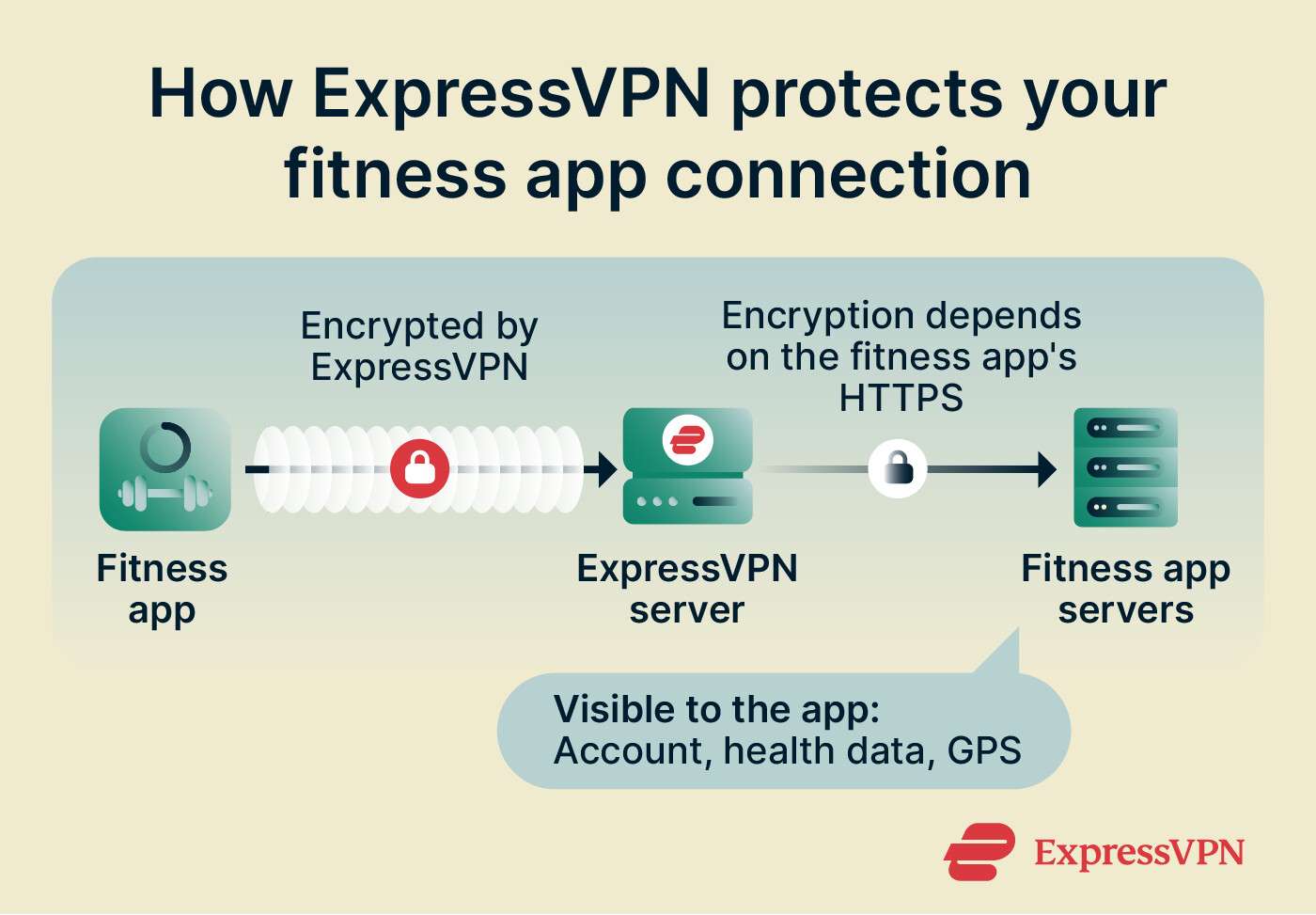
ExpressVPN encrypts the stretch between your phone and its server. After traffic leaves the server, protection depends on whether the fitness app and the service it connects to use HTTPS. ExpressVPN can’t fix an app’s security weaknesses or prevent its provider from reading the data it receives.
How ExpressVPN can limit what apps can link to you
Beyond encrypting your connection, ExpressVPN has two other features that help safeguard your fitness app privacy.
Block connections to known trackers
Block trackers is an Advanced Protection setting that keeps your phone from connecting to known tracking domains, which limits what outside analytics and advertising companies can collect through the apps you use. A fitness app may include code from such companies that contacts their servers while you use the app. ExpressVPN’s Digital Security Lab explains how this code, called tracker software development kits (SDKs), works in its Investigation Xoth research. That 2021 research looked at Android apps in general, not fitness apps specifically, but the same principle applies.
When an app wants to connect to a domain on ExpressVPN’s tracker blocklist, ExpressVPN blocks the request, so the connection never starts. The check runs on your phone, not on ExpressVPN’s servers. It only covers domains on the list, so it can’t stop an app from sending data straight to its own servers, and it won’t catch a tracker that isn’t listed.
Block trackers is available on all ExpressVPN plans and works only while the VPN is connected. To enable it, connect to ExpressVPN, go to Add-ons > Advanced Protection, and turn on Block trackers.
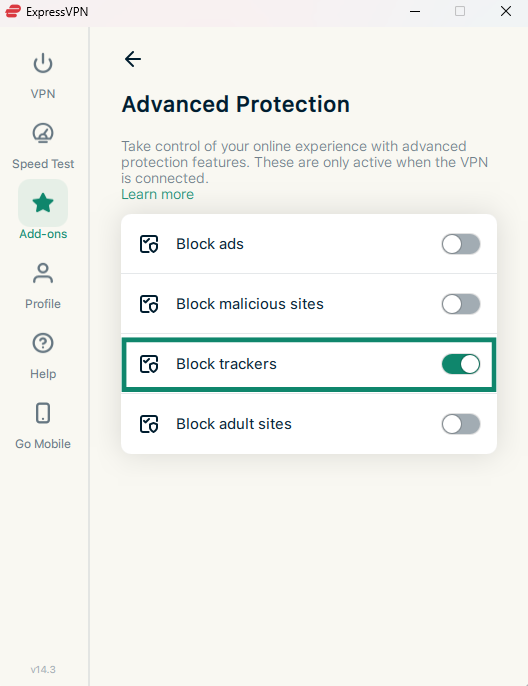
See our Advanced Protection guide for the full device-specific instructions.
Keep your real email address private
ExpressMailGuard, included with all ExpressVPN plans, lets you sign up to a fitness app with an email alias instead of your primary address, so the app only ever sees the alias. Messages sent to the alias are forwarded to your main inbox.
A fitness app tied to your real address gives the provider a way to link you to your other accounts. It also means your email address (and any other associated account) details will be exposed if the app suffers a database breach. With a separate alias for each app, providers can’t match your accounts by email, and you can switch off one alias without affecting your real address or your other aliases.
However, an alias only keeps your real email address private. The app still has the name, birthday, payment details, and health data you shared with it.
To create an alias, sign into ExpressMailGuard with your ExpressVPN account, select Aliases, choose the type of alias you want, and follow the prompts.
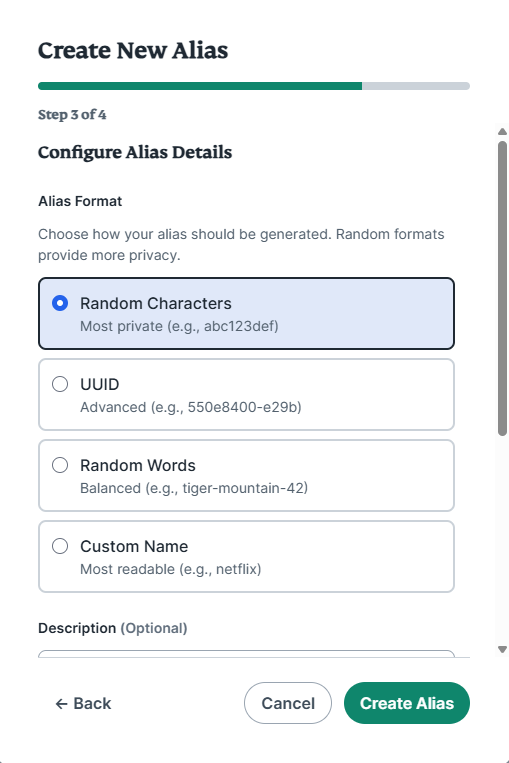
Then enter the alias on the fitness app’s sign-in form. Our getting started guide has the step-by-step instructions.
Want to limit what your fitness apps can link to you?
ExpressVPN helps protect the internet connection your fitness apps use, masking your public IP address and encrypting traffic between your device and the VPN server.
Protect your fitness app privacy with ExpressVPN
Try it risk-free with our 30-day money-back guarantee for new users.
Does ExpressVPN protect your fitness app data?
ExpressVPN protects the connection between your phone and its servers, but it can't control what a fitness app collects or how the provider uses the data you give it. Here's what falls outside ExpressVPN's reach:
-
Data you share with the app: Your account details, workout history, heart rate, sleep patterns, and any other health metrics you enter or let the app access go to the app’s provider.
-
GPS location: ExpressVPN changes the IP address and IP-based location that apps see, but it doesn't change your phone's GPS. A fitness app with location permission can still record your running routes, cycling distances, and other location-based activities.
-
Wearables: Data a smartwatch or fitness tracker sends to your phone over Bluetooth isn’t internet traffic, so ExpressVPN can’t protect it. When your phone’s fitness app uploads the data, it can protect that traffic while it’s connected.
-
Device identifiers: Changing your IP address doesn't change your device's advertising ID, which apps and advertisers can use to recognize your device. On iPhone, apps must ask your permission before tracking your activity across other services. On Android, you can reset or delete it in Settings.
Can ExpressVPN see your fitness app activity?
ExpressVPN doesn't collect or store data about which fitness services your apps connect to, what they send, or the Domain Name System (DNS) lookups your phone makes while you’re connected. DNS lookups are requests that turn a service’s name into the IP address your phone uses to connect. It also keeps no connection logs, so there’s no record of your IP address, the VPN IP address you were given, or when and how long you connected.
So, for example, that means ExpressVPN might know that an account connected to a Los Angeles VPN location on a Tuesday and transferred 300MB of data. It wouldn’t know whether that was a workout upload, which app sent it, or what the app sent, because it doesn't collect destinations or data content. Data ExpressVPN doesn’t have can’t be matched to a person’s activity or handed over, even if it were legally compelled.
A 2025 KPMG audit assessed ExpressVPN’s privacy policy and its TrustedServer technology, including whether its servers operated as the policy describes.