Expressvpn Glossary
Zip bomb
What is a zip bomb?
A zip bomb, also called a decompression bomb or a zip of death, is a malicious archive that looks small but is designed to expand into an enormous amount of data when opened. Its purpose is to overload any system that tries to unpack it by consuming excessive system resources, potentially slowing down, rebooting, or crashing the device.
How does a zip bomb work?
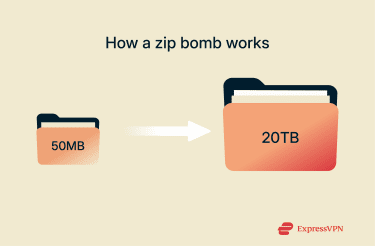 Zip bombs take advantage of compression algorithms that reduce file size by finding repeated patterns and storing them more efficiently. A zip bomb is built so that those patterns repeat an enormous number of times.
As a result, when the file is opened, the decompression process expands those patterns back into a massive amount of data, far more than the computer expects. In extreme cases, a file that’s only 50MB in size can expand into tens of terabytes when decompressed.
Why are zip bombs dangerous?
The expansion of the compressed data inside the zip bomb isn’t harmful in the traditional “virus” sense, but it can overwhelm a system’s resources. Depending on its design, a zip bomb can:
- Slow down or crash devices: Zip bombs can overwhelm a system’s memory and processor, causing severe lag or even forcing older devices to restart or crash.
- Cause cascading failures: When a zip bomb fills storage or memory, it can interrupt backups, corrupt files, or trigger failures in other connected systems and applications.
- Disrupt business operations: Cybercriminals may use zip bombs as a form of denial-of-service (DoS) attack that incapacitates systems, causing downtime.
- Interfere with security tools: Zip bombs can distract, overload, or crash older antivirus scanners, allowing attackers to deploy additional malware without detection.
Detecting and mitigating zip bombs (security best practices)
Common security practices used to defend against zip bombs include:
- Scanning archives with antivirus tools: Most modern security software can inspect file structures and recognize suspicious compression patterns.
- Applying security updates: Up-to-date operating systems, antivirus programs, and archive utilities are better equipped to detect and block malicious files.
- Analyzing files in a sandbox: Virtual machine utilities can be used to open suspicious archives in an isolated environment to prevent potential system impact.
- Filtering unusual archives: Files from untrusted sources, exceptionally small archives, or unexpected file extensions can be flagged or blocked for further review.
Further reading
- How to prevent phishing attacks: Best practices and prevention tips
- 10 phishing red flags in emails and what to do about them
- What’s a possible sign of malware? 11 red flags to watch for
FAQ
What happens if you open a zip bomb?
Opening a zip bomb allows it to decompress and expand into a massive volume of data. The extraction process overloads system resources, potentially slowing down, rebooting, or crashing the device.
Are zip bombs still used in modern attacks?
Yes, although they’re less common today. Some attackers may still employ zip bombs as part of a multi-stage attack, as they can cause damage by overwhelming system resources and disrupting business operations.
Can antivirus programs detect a zip bomb?
Yes, most modern antivirus programs can detect zip bombs by scanning for recognizable patterns, such as suspicious file structures and compression ratios. Updating the antivirus to the latest version is essential to ensuring accurate detection rates.
Can a zip bomb crash my antivirus?
Crashing modern antivirus software is unlikely, since most tools can detect and block zip bombs before full extraction. However, older scanners may be overloaded or disrupted by a zip bomb, which can prevent proper detection or temporarily disable scanning functions.