What happened to secret conversations? How private is Facebook Messenger today?



Facebook Messenger used to offer a “secret conversations” feature that provided a more private way to chat with friends and family. However, if you’re a regular Messenger user, you may have noticed that it’s no longer available. This guide looks in more detail at what happened to secret conversations and how private and secure Messenger is today.
What happened to secret conversations on Facebook?
If your secret chats on Messenger disappeared and you can no longer see the “secret conversation” option, it’s because Meta is in the process of rolling out default end-to-end encryption (E2EE) to eligible one‑on‑one chats.
The original purpose of secret conversations
Secret conversation was an opt-in feature available on Messenger that allowed you to enable E2EE for personal chats. It was introduced at a time when the platform used standard encryption: it encrypted data in transit and at rest, but encryption keys were managed by Meta.
The “secret conversation” feature gave users the option to chat and send media (like pictures, videos, and voice recordings) in a safer and more private way. When enabled, it meant only chat participants could read the messages or media, because chat participants were the only ones with the keys.
What does Messenger encrypt end-to-end?
According to Meta, default E2EE currently applies to one-to-one chats and any media shared within them. One-on-one audio and video calls with private individuals also use E2EE by default. That said, business chats, Marketplace messages, and community chats for Facebook groups still use standard encryption instead of E2EE.
How E2EE works on Messenger
E2EE on Messenger works much like it does on other secure messaging apps. Your device uses cryptographic keys to scramble each message into unreadable ciphertext before it leaves your device. It does this using an implementation of the Signal Protocol for message encryption, and its own Labyrinth Protocol for encrypting stored messaging history between a user’s devices.
Once the message has been encrypted, it remains encrypted as it travels from your device to Meta’s servers and onward to your recipient. Only the recipient’s device, which holds the relevant decryption keys, can turn the ciphertext back into readable content, whether it’s text, photos, videos, or voice messages.
How to tell if your chats use E2EE
You can tell if your chat is encrypted in a few simple steps:
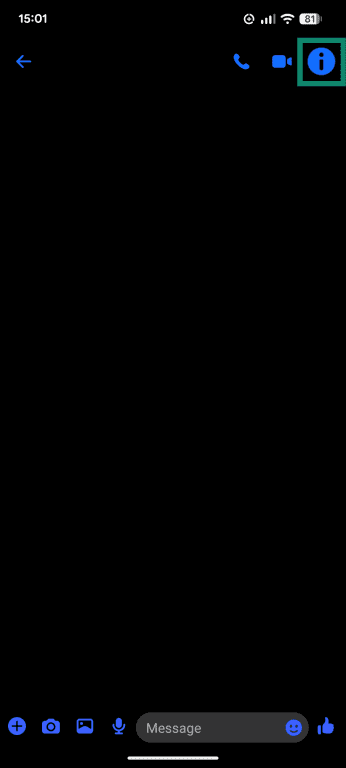
- Open the chat you want to check and tap the user’s name or the i icon in the top-right corner.
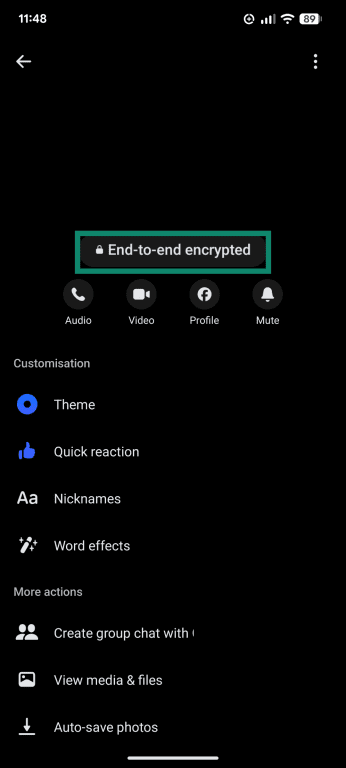
- Look for the text that reads “End-to-end encrypted” under the user’s profile image.
How to manage E2EE chats in Messenger
Messenger lets you manage how E2EE conversations are stored, protected, and verified. This section walks through those settings and what they mean for your privacy. Note that since these features are currently being rolled out, you might not see all the options below in your version of the app.
To find the E2EE settings in Messenger:
- Select Menu and click Settings.
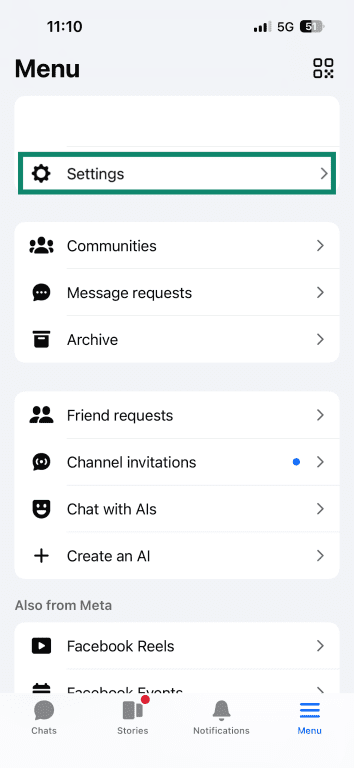
- Tap Privacy & safety, then select End-to-end encrypted chats.
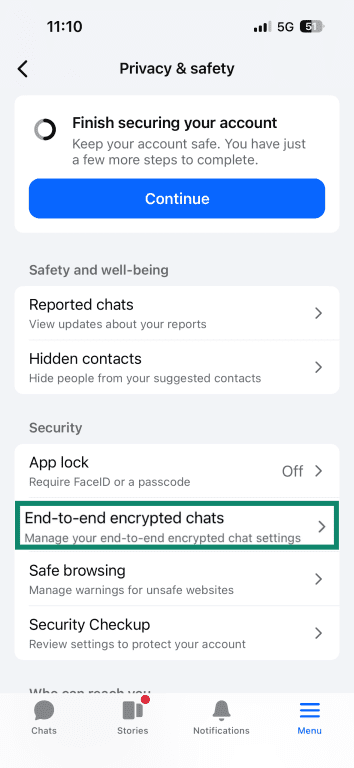
- Here, you’ll see a range of options, including Message storage, Security alerts, and Verify key in chats.
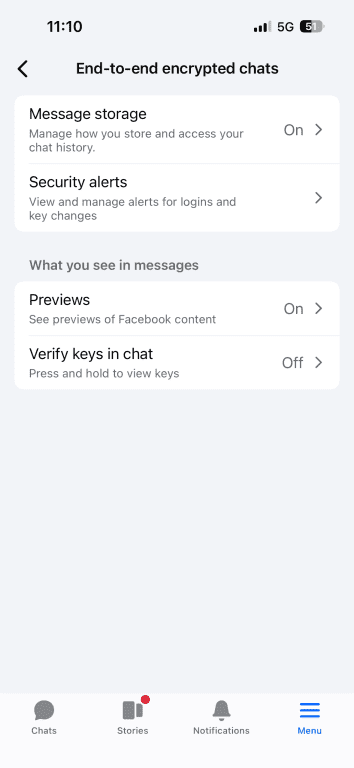
Message storage
Message storage automatically creates encrypted backups of your E2EE chats. By default, these backups are stored in the cloud, so you can restore your message history on a new device with a PIN or recovery key. You can turn this setting off by tapping Turn off automatic uploads. If you do that, your backup is stored on your device and you won’t be able to restore chats until you turn it back on.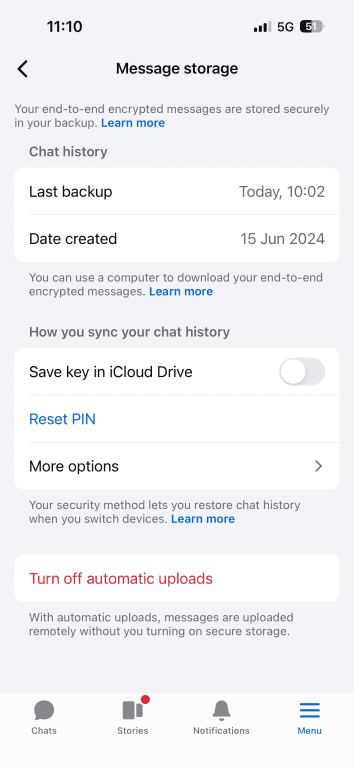
Security alerts
Security alerts let you know when a new device is being used to log into your account and when encryption keys change. Key changes can occur for routine reasons, like if a new device is added, Messenger is reinstalled, or if secure storage is turned on or off.
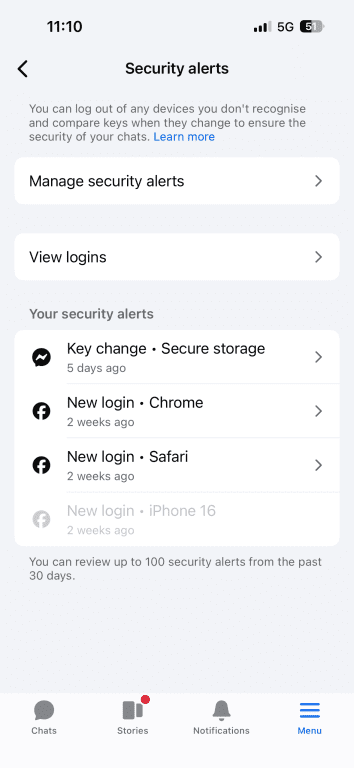 The “View all logins” section of the security alerts page shows every logged in device that can send and receive E2EE messages from your messenger chat. It’s a useful way to confirm that all activity is yours. If something appears unfamiliar, you can open it and log that device out, which removes that device from the end-to-end encrypted chat.
Verify keys in chat
The Verify keys in chat toggle allows you to compare keys directly from the chat. When this option is toggled on, you can long-press on a message and see the key for that device. If the key your device shows matches the key their device shows, it confirms that the conversation is end-to-end encrypted between those devices. Each participant should compare keys on their own device to verify their device access as well.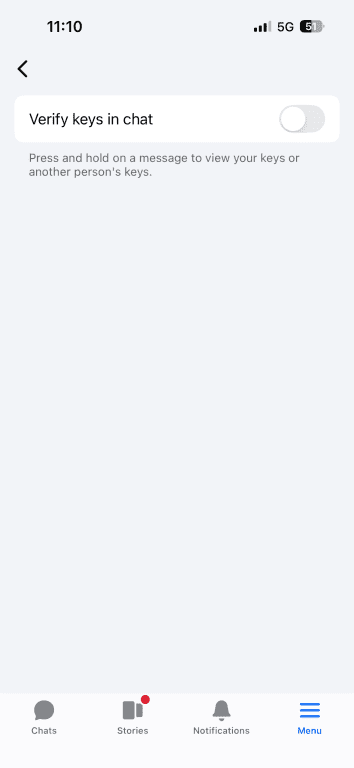
Can you still send disappearing messages?
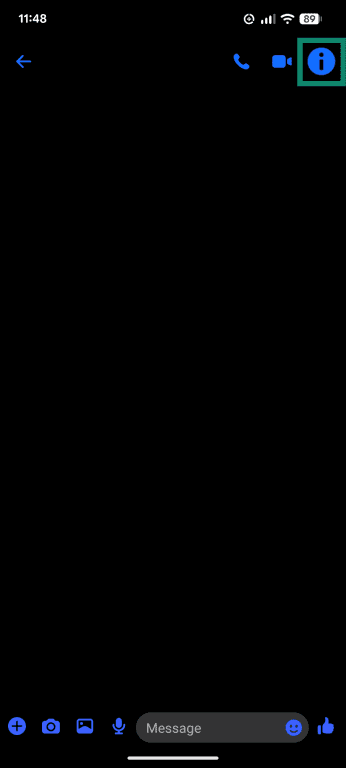
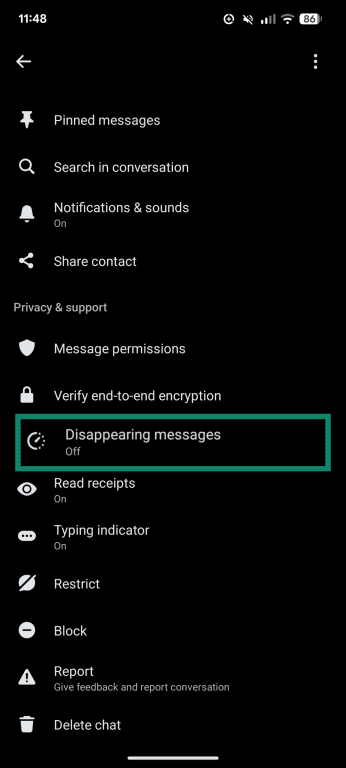
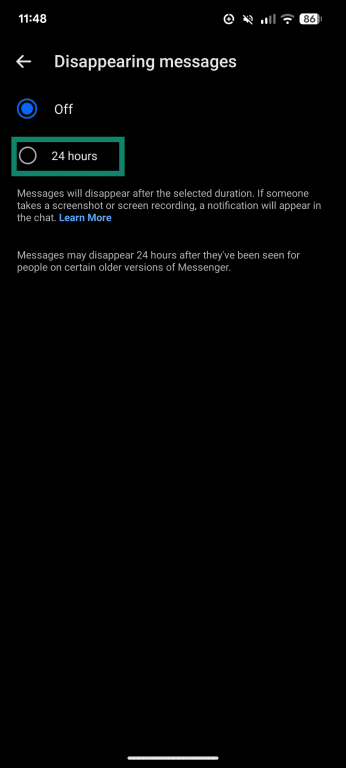
Yes, it’s still possible to send disappearing messages on Messenger. This feature was originally only a part of secret conversations and is now being rolled out more broadly, though it may not yet be available for all users or chats. To send disappearing messages, you can:
- Open Messenger, select the chat you want to send a disappearing message in, and tap the i button at the top of the screen or the contact’s name.
- Scroll down and select Disappearing messages.
- Choose a time duration. Once you’ve selected it, your messages to that contact will automatically disappear after the chosen time has elapsed.
Messenger vs. other encrypted apps
Messenger vs. WhatsApp and Signal
All three apps support E2EE for chat messages, media sharing, and voice and video calls. The main difference is which types of conversations it applies to. Messenger only supports E2EE for personal, one-on-one chats, while business, Marketplace, community, and group chats use standard encryption. Signal and WhatsApp use E2EE across all chats by default, including group chats (and business chats on WhatsApp).
Messenger vs. Telegram
Messenger and Telegram both support E2EE for certain types of conversations. On Telegram, you have to turn on secret chats manually for E2EE. Standard Telegram chats use client-server encryption, which means that messages are encrypted in transit and stored on Telegram’s cloud servers. On Messenger, E2EE is the default for personal, one-on-one chats.
FAQ: Common questions about Facebook Messenger
Is Facebook Messenger end-to-end encrypted now?
Facebook Messenger is rolling out default end-to-end encryption (E2EE) on personal messages and calls. E2EE helps protect message contents so that only the people in the conversation can read them.
Why don’t I see encryption in my Messenger chat?
There are a few reasons you may not see encryption in your Messenger chat, like if you’re still using an old, outdated version of the app. Updating to the latest version or doing a fresh install of Messenger can help make sure you’ve got the latest features. However, the feature is still in rollout phase, so it may not be available on all accounts or devices. It’s worth noting, too, that encryption is not used for certain types of chats, like Marketplace, business, group, or Community chats.
Can Facebook read my Messenger messages?
Facebook can’t read the contents of messages that are protected with end-to-end encryption (E2EE). Personal chats are being transitioned to E2EE by default, but encryption availability can vary by chat type and rollout status.
E2EE does not currently apply to all conversations, including group, business, Marketplace, and community messages.
Are Messenger voice and video calls also encrypted?
Yes, all personal voice and video calls made on Messenger are end-to-end encrypted, just like text-based messages.
Can police or government access encrypted Messenger chats?
Police or government agencies can’t read the contents of Messenger chats that are protected by end-to-end encryption (E2EE). However, messages may be accessible if authorities gain lawful access to a user’s unlocked device or account, since E2EE doesn’t protect messages from someone who already has access to the device itself.
What happened to secret conversations on Messenger?
The secret conversations feature was gradually phased out as Meta began using end-to-end encryption (E2EE) as standard for personal messages. Since E2EE is becoming the default for eligible chats, there is less need for a separate option.
Take the first step to protect yourself online. Try ExpressVPN risk-free.
Get ExpressVPN