How to protect yourself from the Google Voice code scam


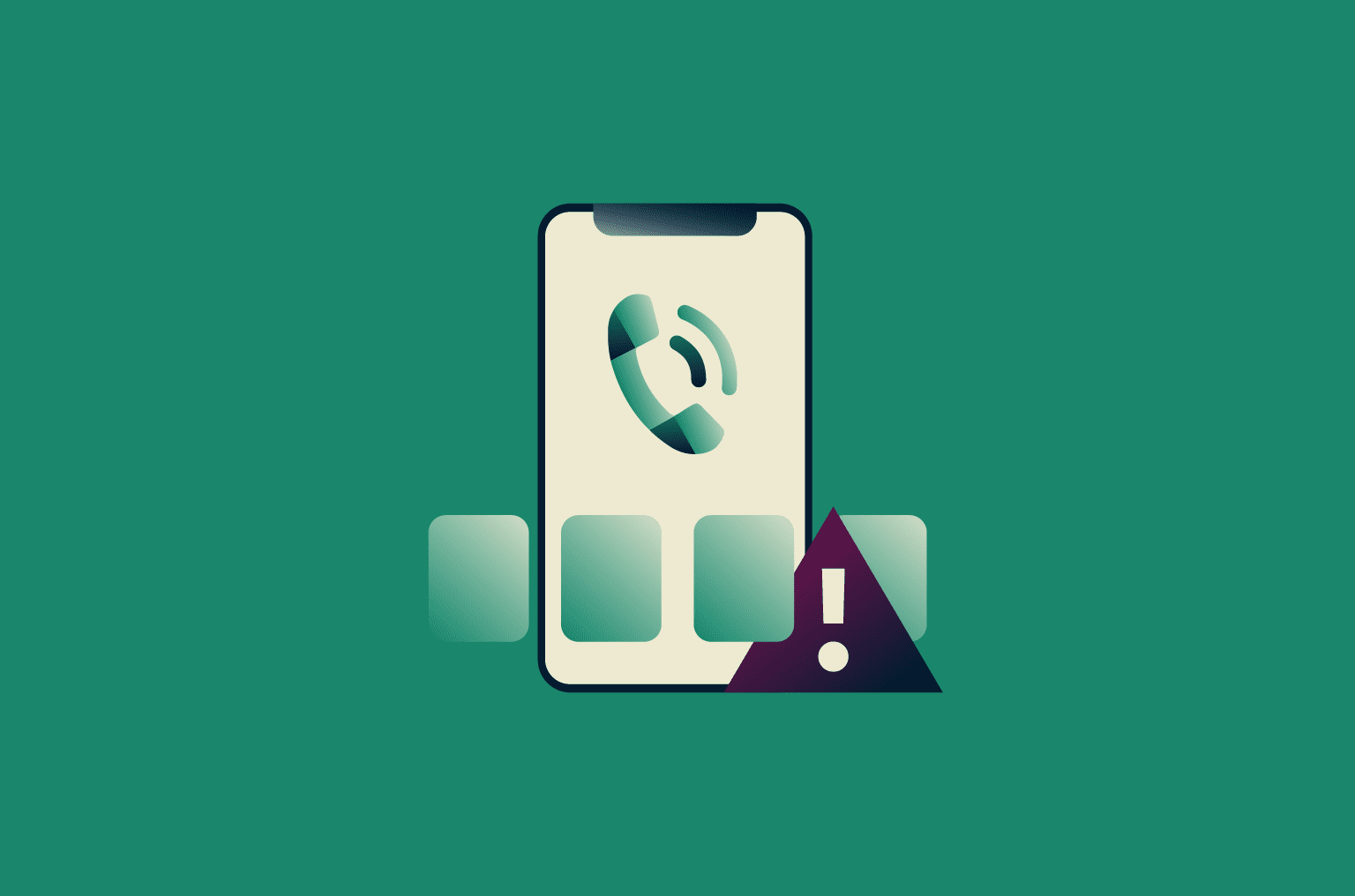
Google Voice is a legitimate service that lets individuals create a virtual phone number linked to a Google account. It’s free for personal use and commonly used for calling and texting over the internet, managing voicemail, and as a secondary number for certain online accounts or contacts.
As part of setup, Google Voice verifies access to a real phone number using a one-time code sent by text. Some scammers abuse this verification step by tricking people into sharing that code, which lets the scammer associate the victim’s phone number with a Google Voice account they control.
In this guide, we explain how this scam works, how to recognize suspicious requests, and what to do if you’ve already been affected.
How does the Google Voice verification scam actually work?
Scammers often reach out through common communication channels such as social media, email, or online marketplaces, and sometimes through text messages or phone calls. When contact begins outside of direct phone communication, they typically steer the conversation toward getting you to share your phone number.
Once the scammer has your phone number, either because you shared it or because the contact started through text or a phone call, they introduce a plausible reason to “verify” your identity, often framing it as a routine safety or trust check.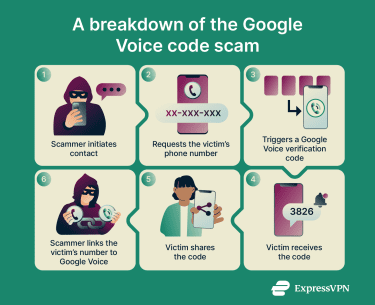
At the same time, the scammer visits the Google Voice website and starts setting up a new account. When prompted to verify a phone number, they enter your number.
You then receive a text message from Google containing a six-digit verification code. Shortly afterward, the scammer asks you to share the code.
If you share the code, the scammer can complete Google’s verification step using your phone number and create a Google Voice account you don’t control. The Google Voice number may then be used in further scams or account sign-ups, often without you realizing what’s happened.
Why scammers want your Google Voice verification code
Scammers use Google Voice code scams to create anonymous phone numbers that appear legitimate and are difficult to trace. Google Voice numbers are especially valuable to scammers because they:
- Free: Scammers can create and abandon numbers at no cost, making it easy to scale scams and discard numbers once they’re reported without losing money.
- Appears as a U.S.-based number: U.S. numbers look more legitimate to American targets and are less likely to trigger suspicion, blocks, or spam filters than international numbers.
- Not tied to a traditional carrier account: Unlike mobile carrier numbers, virtual numbers don’t require SIM cards, contracts, or extensive identity checks, reducing traceability and friction.
- Can be created quickly at scale: Fast account creation allows scammers to replace blocked numbers instantly, rotate identities, and run multiple scams in parallel.
However, Google requires a real phone number to activate a new Voice account. That’s where the scam comes in.
Types of Google Voice scams
Google Voice verification code scams can appear in several contexts, depending on how scammers reach potential victims. While the tactics may vary, the goal is always the same: to trick you into sharing a verification code so they can register a Google Voice number using your phone number.
Here are the most common forms of this scam and how they work:
- Fake marketplace listings: On online marketplaces, scammers may pose as either buyers or sellers. They ask for your phone number and claim they need to verify that you’re a legitimate person, often citing past issues with fake listings or fake sellers/buyers. They then send a verification code and ask you to share it.
- Lost pet and community scams: This version often happens in neighborhood groups, community forums, or local social media pages. For example, you might post a missing pet alert. Someone messages you claiming they found your pet but says they’ll send a code to verify your identity and confirm you’re the rightful owner.
- Romance and trust-building scams: Romance scams involving Google Voice codes usually develop over longer periods, making them more sophisticated than quick marketplace cons. These scammers invest time building emotional connections on platforms like Tinder, Bumble, Instagram, or Snapchat before making their move. After some conversation on these apps, they suggest moving to text or phone calls. Before sharing their “real” number, they claim they need to verify your identity for safety. They request that you share a verification code to prove you’re not a catfish or scammer.
- Job and gig opportunity scams: A scammer pretends to represent a company or hiring manager. They claim they need to verify your identity before they proceed, explaining it’s standard procedure for background checks or payroll setup. As part of the verification, you receive a Google verification code.
- Fake tech support scams: In this version, scammers impersonate customer support representatives from companies like Google, your mobile carrier, a bank, or a delivery company. They often claim there’s a problem with your account, suspicious login activity, a blocked verification request, and so on. The scammer then convinces you to “confirm your identity” or “verify ownership” before prompting Google Voice to send a code directly to your device. They then ask you to read it back for them.
What scammers do once they get your code
Scammers first link your phone number to their Google Voice account. When you give them the verification code, you’re unknowingly approving the setup of a Google Voice number using your phone as the forwarding/verification number.
It’s important to note that scammers do not take over your phone, do not read your texts and don’t gain access to your Google account through this scam. But they do get a fully functional Google Voice number that was created using your phone number for verification, making it harder to trace back to them.
Once the Voice number is activated, scammers typically unlink your phone number and replace it with another forwarding number (or none at all). This prevents you from reclaiming the Voice number later.
They then use the Voice number for various schemes, such as:
- Phishing and smishing scams.
- Marketplace fraud (Facebook Marketplace, Craigslist, OfferUp).
- Account verification abuse on other platforms.
- Impersonation of businesses or individuals.
- Robocalls and scam texts.
How to protect yourself from the Google Voice code scam
A good way to protect yourself from Google Voice code scams is to learn to recognize scammers’ tactics before you fall for them.
Warning signs to watch for
Most Google Voice verification code scams follow recognizable patterns. Spotting them early can help you avoid sharing your phone number or responding to a suspicious request.
Watch out for:
- Anyone asking for a Google verification code for any reason.
- A stranger pressuring you to “verify” your identity.
- Messages claiming you need to prove you’re not a scammer.
- Someone saying they’ll send a code “just to check your identity.”
- Unusual verification requests from buyers, sellers, or group members.
- Conversations that start normally but quickly shift to identity checks.
Remember, no legitimate buyer, employer, friend, romantic interest, or support agent will ever need you to send them a Google verification code.
Additional ways to prevent the Google Voice code scam
Following a few basic online security practices can significantly reduce the risk of Google Voice code scams and other forms of verification code abuse:
- Only enter verification codes into the service you personally started using: Verification codes are legitimate only when you initiated the sign-up or login yourself, and you enter the code directly into that same website or app. If someone asks you to send, forward, or repeat a code to them, the verification is being misused.
- Treat unexpected Google Voice messages as a red flag: If you receive a Google Voice verification text when you didn’t try to set up Google Voice or didn’t request a code yourself, someone is actively trying to create an account using your number.
- Keep conversations on the original platform until trust is established: Stay within the original service until you’ve verified the other party’s legitimacy and no “verification” steps are required.
- Claim Google Voice proactively (optional but effective): Once a number has been used for Google Voice, it generally can’t be reused for another account.
These steps help reduce the risk of Google verification code abuse, even if scammers already have your phone number.
What to do if you’ve been scammed
If you shared a Google Voice verification code with someone, it’s important to understand what did and did not happen before taking any action. This type of scam does not give the scammer access to your phone, your text messages, or your Google account. Your real phone number is not taken over or duplicated. Instead, it was used once to help the scammer activate a separate Google Voice number under their own Google account.
Can you reclaim your number?
In most cases, there is no reliable way to undo a Google Voice activation after a verification code scam. When your phone number is used to verify a Google Voice account, Google typically records that number as already used for Voice verification, even if the scammer later removes it from their account. As a result, you usually can’t take control of the Google Voice number that was created, and you may also find that your phone number is no longer eligible to set up Google Voice under your own account.
If the scam just occurred, it’s still worth acting quickly. You can sign into Google Voice with your own Google account and try adding your phone number under Linked numbers. Google may send a verification code to confirm that you still control the number. In limited cases, if your number is still actively linked to another Google Voice account, Google may display an option to reclaim it. You can also visit this page to try to take your number back. Google will send a six-digit verification code to your phone via text message. Entering this code proves you're the actual owner of the phone number. Google will then automatically detach your number from the scammer’s account.
However, in most Google Voice code scams, the scammer completes setup quickly and removes your phone number soon afterward. Once that happens, Google generally treats the number as already used and unavailable, leaving no practical way to reclaim the Google Voice account or reuse your phone number for Google Voice in the future.
How to report the scam
You can report the scam to the Federal Trade Commission (FTC) at reportfraud.ftc.gov.
If the scam originated on a platform like Facebook Marketplace, Craigslist, WhatsApp, or a dating app, report the scammer’s profile to that platform as well. While this rarely results in individual recovery, it helps those services identify patterns and block repeat offenders.
How to monitor and secure other accounts
Even though the damage is usually limited, it’s still a good idea to take a few precautionary steps. Changing passwords or enabling two-factor authentication (2FA) won’t reverse what happened, but it can help prevent follow-up scams or escalation if the scammer tries to contact you again.
- Enable 2FA on all your online accounts where possible.
- Check devices and locations with active sessions by opening the security section of each account and reviewing the list of currently signed-in sessions. If something doesn’t look familiar, terminate that session from the same page.
- Monitor your email inbox for suspicious password-reset attempts.
- Use services like Have I Been Pwned to monitor whether your email addresses or phone numbers appear in data breaches.
Consequences of falling for a Google Voice code scam
The most important thing to take away is that falling for a Google Voice code scam usually causes a one-time, limited impact. Your phone continues to work normally, your Google account remains secure, and there is no ongoing access for the scammer. The main consequence is that your phone number may no longer be eligible for Google Voice, and there is often no way to reverse that. Understanding that limitation can save a lot of unnecessary panic and wasted recovery attempts.
You should also be prepared for the possibility that people may reach out to you later, believing your number was involved in a scam. If that happens, briefly explain that your number was misused without your consent.
FAQ: Common questions about Google Voice code scams
Why did I receive a Google Voice verification code?
If you receive a Google Voice verification code unexpectedly, it means someone entered your phone number while trying to set up a Google Voice account. In most cases, this indicates that a scammer has your phone number and is attempting to use it for their Google Voice account.
If you didn’t request the code, ignore the message, and if someone contacts you asking for the code, it’s part of a scam, even if they sound trustworthy.
Can someone hack me with my Google Voice verification code?
No, but they can create a Google Voice number using your phone number. Sharing your verification code allows scammers to link your number to a Google Voice account they control. They can then use it to create accounts and run scams under a number that could be linked to your real phone number. However, they can’t typically access your phone, email, or Google account with this code alone.
Why don’t scammers just use their own numbers?
Most scammers don’t have access to clean, unused U.S. phone numbers that aren’t already flagged, burn through numbers quickly due to abuse reports, and need to scale fast without cost. Using victims’ phone numbers solves all of those problems for them.
Take the first step to protect yourself online. Try ExpressVPN risk-free.
Get ExpressVPN