What is Emotet malware? How it spreads and how to stop it



Emotet is a long-running and highly adaptable malware strain that keeps coming back, even after major takedowns. It’s been around for years and is responsible for large-scale attacks against organizations worldwide.
In many cases, the real damage comes after the initial infection. Emotet serves as the first step in a much larger attack, such as data theft, network compromise, or ransomware.
This guide breaks down what Emotet malware is, how it spreads, and why it’s so persistent. We’ll also cover how to spot the signs of infection and remove it safely.
What is Emotet malware?
Emotet is a malware family that first appeared in 2014 as a banking trojan designed to steal financial credentials. Over time, it evolved into a modular tool and botnet platform, allowing attackers to customise its functionality for different campaigns. For this reason, Emotet acts primarily as a loader for other malware rather than a standalone threat.
Emotet is commonly described as operating in a Malware-as-a-Service (MaaS) model. The group behind it maintains the infrastructure and controls infected systems. Other cybercriminals can rent access to those systems to deliver their own payloads, including trojans like TrickBot or Qbot, and in some cases, ransomware deployed later in the attack chain, such as Ryuk.
To make this possible, Emotet connects to a command-and-control (C2) server, allowing attackers to send instructions, receive reports from infected systems, and enable further activity such as lateral movement, often through additional modules or secondary malware.
How does Emotet spread?
Emotet primarily spreads through social engineering rather than exploiting software flaws. This allows it to spread quietly and quickly, often before victims realize their system has been compromised.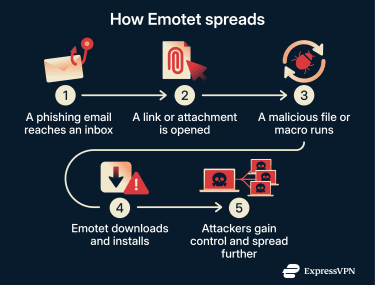
Malicious links and attachments
Emotet most often spreads through large-scale phishing campaigns. These emails are designed to look routine, so victims are more likely to trust them and act without thinking.
They often appear to be:
- Shipping updates or delivery problems.
- Payment requests and invoices.
- Account alerts.
Some campaigns use real-world events to appear more convincing. For example, during COVID-19, Emotet campaigns targeted U.S. organizations with messages that appeared to be internal updates, such as a “May COVID-19 update.”
The malicious content may arrive as a link to a compromised website or as an attachment included directly in the email. In both cases, the goal is the same: to prompt user interaction that triggers the infection. Victims may be asked to click a link to view more details or to open an attached file, such as a Word document, a PDF, or a ZIP file containing an Office document. When opened, these files may prompt the user to enable macros or other content, allowing the malware to run.
This method is common in attacks on businesses, healthcare organizations, and government, where document sharing is routine and macro requests don’t seem unusual.
Reusing stolen emails to spread further
Once Emotet infects a device, it can access the user’s emails and contact list. That information is then used to send new phishing messages.
Instead of starting from scratch, Emotet campaigns often reply to existing email threads. They reuse real subject lines and past messages, so the email looks like part of an ongoing conversation that the target recognizes.
These emails are typically personalized. The subject line, sender name, or greeting line may include the target’s name, job role, or company, making malicious messages seem familiar.
Lateral movement and corporate networks
Once inside a network, Emotet can collect credentials and facilitate lateral movement, either directly or by enabling secondary malware to spread further. This often includes:
- Harvesting saved passwords from email clients and browsers.
- Pulling login details used for shared drives and internal systems.
- Scanning the network for writable shared folders and servers.
- Copying itself to other systems using available credentials.
In some cases, it can reach systems that store sensitive data or manage core business functions. A single infected email account can potentially compromise multiple systems, even if only one person opened the original message. If stolen details are reused on personal devices or external services, the damage can extend beyond the corporate network and increase the risk of identity theft.
Emotet is also known to use Server Message Block (SMB) to support this lateral movement. Research shows that the malware lists network shares and reachable hosts. It then uses stolen or brute-forced credentials to move to other systems within the network.
This allows Emotet to navigate trusted internal networks with little or no extra user interaction, especially in environments with extensive SMB access and weak segmentation. While this behavior appears worm-like, it relies on credential abuse and legitimate SMB functions rather than exploiting public SMB vulnerabilities.
How to identify an Emotet infection
Emotet infections are hard to spot, as there are usually no obvious alerts or visible signs without security monitoring tools. Detection generally depends on recognizing unusual behavior and using the right tools.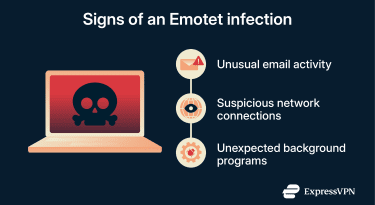
Common symptoms
Most users won't know they're infected until something seems off. Common indicators of an Emotet infection include:
- Unusual email activity: Contacts receive emails or replies to existing threads that the account owner didn’t send and which may also appear in the account’s Sent Items folder.
- Suspicious network behavior: Repeated connections to unfamiliar external servers, traffic to random-looking domains, or ongoing background activity when the device isn’t in use.
- Unexpected processes or account activity: New files appearing or programs running in the background, security tools flagging unfamiliar processes, or unexpected one-time passcodes (OTP) or two-factor authentication (2FA) prompts. Repeated or unexplained authentication requests may indicate stolen credentials being tested on other systems.
Detection tools and threat intelligence sources
Emotet changes frequently, so signature-based detection alone is often unreliable, making behavioral monitoring more effective. For example:
- Endpoint protection tools: These tools flag suspicious behavior, such as unfamiliar programs running, unexpected file changes, or attempts to download additional malware.
- Network monitoring: Unusual outbound traffic, repeated connections to unfamiliar servers, or traffic at odd hours can indicate an infection.
Meanwhile, organizations with security teams can monitor external sources for early warnings:
- Indicators of compromise: These are known warning signs associated with Emotet activity, such as malicious domains, server addresses, or file hashes of infected files.
- Threat intelligence feeds: Ongoing updates about active Emotet campaigns and infrastructure. Government agencies, like the Cybersecurity and Infrastructure Security Agency (CISA), publish alerts on current threats.
What to do if you suspect an Emotet infection
Emotet is designed to spread, so early containment is critical. Here are the steps to take right away:
- Isolate the affected device: Disconnect it from Wi-Fi or a wired network to prevent the malware from reaching other systems.
- Pause email activity: Don’t open, reply to, or forward emails from the suspected account.
- Confirm the infection: Run a full malware scan to help identify threats and related activity. However, additional investigation may be required to identify secondary malware or ongoing network activity.
In a business environment, users should avoid attempting to remediate the system themselves and instead follow internal incident-response procedures. For example, notify the IT department or the relevant security contact immediately. Typically, they would look for the same signs on connected devices and review sent emails for unusual replies or internal messages that could indicate the malware has spread further.
How to remove Emotet malware
If you’ve confirmed an Emotet malware infection, following these steps can help to remove it:
- Run a full system scan: Use up-to-date antivirus or endpoint security software. Remove or quarantine anything identified as Emotet or related malware. You can also contact an antivirus software provider to help guide you.
- Reset affected credentials: Do this using a known-clean device and consider changing passwords for any accounts that may have been accessed before the infection was detected.
- Monitor for persistence: After cleanup, watch for unusual behavior, such as unexpected outbound connections or email activity, or known indicators or compromise (IOC) linked to Emotet, which may indicate lingering access or reinfection. Additionally, run follow-up scans for potential secondary infections.
- Confirm the system is clean: Only reconnect the device to the network once scans return no results and there’s no further suspicious activity.
Read more: Suspect malware on your Android? Learn how to remove mobile malware safely.
How to restore infected systems safely
Even after you’ve removed Emotet, handle recovery carefully.
- Consider rebuilding instead of cleaning: In higher-risk cases, especially in Windows-based business environments, wiping and reinstalling the system is safer than attempting to clean it.
- Restore from known-good backups: Only use backups created before the infection. Scan them before restoring data.
- Harden before reconnecting: Patch the operating system and software, update endpoint protection, and reconnect the system gradually.
- Document what happened: In a business environment, record indicators, timelines, and affected systems while details are fresh. This helps prevent repeat incidents and may be helpful for the IT team.
Protecting against Emotet and similar threats
Small, consistent controls can significantly lower the risk of Emotet infection.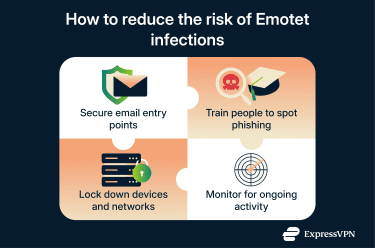
Core prevention strategies and email filtering
Emotet most commonly relies on phishing, making email security a critical first line of defense. For individuals and organizations alike, the following protections are typically handled by security software and email filtering tools:
- Block malicious attachments and links: Email filtering can help you block suspicious file types (such as macro-enabled documents or compressed ZIP files that hide scripts) or links before they reach your inbox.
- Block known malicious domains and IP addresses: Many security tools automatically block known domains and IP addresses associated with Emotet-based malware. In enterprise setups, blocking can be combined with Domain Name System (DNS) logging and network traffic monitoring to detect suspicious connections that aren’t yet publicly listed.
- Flag risky file behavior: Built-in email and malware protections typically quarantine messages that ask users to bypass security warnings or enable macros.
Read more: Understand how to protect your home computer and strengthen your defenses against malware.
User training and awareness campaigns
Many Emotet infections start with opening an attachment or enabling macros. In a business environment, formal training reduces that risk as it teaches employees to:
- Question any messages that create urgency or don’t quite match the usual tone of the sender.
- Be cautious with attachments and links, especially if they ask to enable macros or download files.
- Double-check replies in existing email threads, as attackers may reuse real conversations to make malicious messages seem familiar and trustworthy.
Securing endpoints and networks
Emotet spreads more easily in environments with poor controls. For example, weak or reused passwords make it easier for malware to move between systems. Poor network topology may also allow devices to access more than they need.
To reduce the risk, consider the following:
- Keep software up to date: Updates include security patches that reduce exposure to vulnerabilities often exploited by secondary malware delivered after Emotet infections.
- Use behavioral endpoint protection: Choose tools that detect suspicious activity, not just known malware signatures.
- Limit access between systems: Restrict access to shared drives, admin tools, and internal services to reduce lateral movement.
- Use multi-factor authentication (MFA): Add extra verification steps for sensitive systems to limit the damage if your credentials are stolen.
- Secure remote access: In businesses, use a corporate virtual private network (VPN) to protect remote workers' connections.
The role of ongoing threat monitoring
Emotet may persist even after cleanup. It may leave behind hidden processes, stolen credentials, or scheduled tasks that haven't yet been triggered.
Watch for:
- Repeated connections to unfamiliar external servers. Emotet's infrastructure changes frequently and may rely on rapidly rotating or short-lived servers, making blocking and takedowns more difficult.
- Emails sent without user action.
- Systems attempting to reconnect to external servers or download new files without user action.
These signs can indicate that Emotet is still active or attempting to regain access.
FAQ: Common questions about Emotet malware
How does Emotet spread through phishing emails?
Emotet spreads through phishing emails that look routine or work-related. These emails often include attachments or links and may come from real or compromised accounts, making them harder to spot.
What are the signs of an Emotet infection?
Emotet infections rarely show obvious warnings. However, some common signs of an Emotet infection include emails being sent from your account without your knowledge, unusual network connections, or background activity such as unexpected file downloads.
Can Emotet be removed manually or with tools?
Removing Emotet manually is difficult and unreliable. It’s best handled with trusted antivirus or endpoint security tools. Consider running additional scans, as Emotet often installs other malware or leaves behind access that isn’t immediately obvious.
What are the risks of Emotet to businesses?
Emotet can spread quickly across business networks, and a single infected email account can lead to widespread disruption because Emotet can reuse that inbox to send phishing emails, steal credentials, and spread to other systems on the network. This can affect shared drives, internal tools, and multiple accounts, not just one device.
How does Emotet compare to other types of malware?
Unlike some standalone malware, Emotet primarily acts as an initial access tool. Its main purpose is to spread, collect access, and enable other attacks rather than cause immediate damage on its own.
What are the best protection practices against Emotet?
Strong email filtering, cautious handling of attachments and links, regular software updates, and endpoint monitoring all help reduce the risk of Emotet malware infection. User awareness is especially important, since Emotet relies heavily on human interaction.
What is Malware-as-a-Service (MaaS) and how does Emotet fit in?
MaaS refers to a model in which attackers can use existing malware infrastructure rather than develop their own tools. Emotet is often described as operating in a MaaS-style model, with one group maintaining the malware and command-and-control infrastructure while selectively allowing other criminal groups to use infected systems to deliver their own attacks.
Take the first step to protect yourself online. Try ExpressVPN risk-free.
Get ExpressVPN