How to tell if your baby monitor is hacked


Smart baby monitors make life easier for new parents, letting them keep an eye on their little one. But because many monitors connect to Wi-Fi, the app, or the cloud, they’re exposed to the same security risks as any other connected device.
If you’re worried about a hacked baby monitor, it can be difficult to separate normal glitches from unauthorized access. This article helps you learn common ways baby monitors are accessed, the clearest warning signs, and how to secure the monitor and your Wi-Fi in the long term.
How attackers can gain access to baby monitors
Attackers usually look for the weakest link in the setup, which can vary depending on how your baby monitor works. Some devices rely on a mobile app and cloud account, while others stream video over your home Wi-Fi.
Compromised user accounts (account takeover)
If the baby monitor relies on an online account or app login, an attacker can gain access by reusing leaked passwords from data breaches. Attackers may also try to guess passwords directly. This can happen in two main ways:
- Credential stuffing: Attackers use large databases of leaked email-and-password combinations from past data breaches and automatically test them across multiple websites and apps to find accounts where the same credentials are still in use.
- Brute-force or password-guessing attacks: Automated tools repeatedly try many possible passwords, often starting with common or predictable choices, until one works, which is far more likely when weak or short passwords are allowed.
Another risk is phishing, where a fake email or message pretends to be from the baby monitor company or your app provider. The goal is to trick you into entering your login details on a look-alike website so attackers can capture them.
Exposed internet access (open ports, misconfigurations)
Sometimes, compromises start at the router, not the baby monitor. Features such as remote management, Universal Plug-and-Play (UPnP), or port forwarding can create open network ports that expose devices inside the home to the public internet.
When this happens, attackers can scan for those open services, identify what devices are running behind them, and attempt to log in or exploit known vulnerabilities. In some cases, these exposure points are enabled automatically during setup, so the device owner may not realize their internal network is reachable from outside.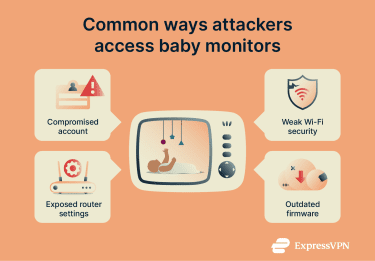
Taking advantage of weak Wi-Fi security
If an attacker can join your home Wi-Fi network, they may be able to see or interact with devices on that network, including baby monitors or the router’s management page. This usually happens when the Wi-Fi itself is easy to break into. Older security standards like Wired Equivalent Privacy (WEP) or early Wi-Fi Protected Access (WPA) versions, weak or widely shared passwords, or “open” guest networks make it much easier for someone nearby to connect.
Some routers and devices also support convenience features that simplify pairing or setup but can lower the barrier for unauthorized access. Once on the network, attackers can scan for connected devices, probe login pages, or attempt to exploit known vulnerabilities.
Exploiting outdated software
Baby monitors, mobile apps, and routers all rely on firmware and software that occasionally receive security updates. If updates are missed or the manufacturer has stopped releasing them, attackers could take advantage of these flaws.
Attackers commonly scan the internet and local networks for Internet of Things (IoT) devices, like baby monitors, running older versions of firmware or operating systems. When they find one, they typically turn to publicly documented vulnerabilities or ready-made exploit tools to gain access.
Choosing a secure baby monitor
When comparing smart baby monitors, the safest options are designed to limit unnecessary exposure, protect data in transit, and stay supported with ongoing security updates.
What makes a baby monitor more secure?
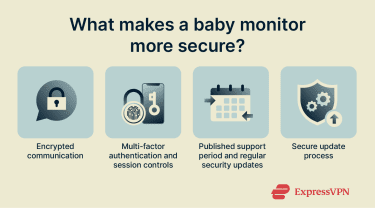
Most of a baby monitor’s security comes down to how well the data is encrypted, how accounts are protected, and whether the device continues to receive software updates. Baby monitors that take security seriously typically offer:
- Encrypted data flows: Video, audio, and login traffic should be encrypted so that anyone intercepting the data can’t read or view it. Encryption helps prevent exposure of footage and credentials.
- Strong authentication for accounts: Secure systems support strong, unique passwords and, ideally, two-factor authentication (2FA), so stolen or reused passwords alone aren’t enough to gain access.
- Regular software and firmware updates: Like any connected device, baby monitors can become less secure over time. Ongoing updates reduce the window in which known vulnerabilities can be exploited.
- Minimal attack surface for remote access: Better-designed monitors avoid exposing unnecessary services to the internet or relying on router settings like open ports. The fewer external entry points, the safer the device generally is.
How to evaluate security features before buying
Understand how the monitor connects and where the video goes
Smart baby monitors generally work in one of three ways, and each has different security trade-offs. Some monitors are “local-only,” meaning you can only view the video when you’re on the same home Wi-Fi. In that case, the video never leaves your network. That usually means fewer exposure points, though you don’t get remote viewing when you’re away from home.
Others are cloud-connected. These let you view the feed from anywhere because the video goes through the manufacturer’s servers first. That’s more convenient, but it also means the company’s own systems become part of the equation. With this type, strong passwords, 2FA or multi-factor authentication (MFA), and choosing a reputable brand matter a lot more.
Then there’s a third category of monitors that ask you to enable port forwarding or to open a port on your router so you can view the feed remotely. That setup exposes the camera directly to the internet and creates the highest risk, which is why it’s generally best avoided for baby monitors.
What the brand actually says about security
Most product pages say the word “secure” somewhere, but what matters is whether the company explains how your data is protected. Good signs include clear mention of encrypted connections, support for 2FA or MFA, and a description of how access to your account is controlled.
Whether the product receives updates
A baby monitor isn’t a “buy once and forget about it” device, at least not from a security standpoint. Over time, vulnerabilities are discovered in many connected products. It’s a good idea to check how often a baby monitor gets updated by looking at firmware release notes, app updates, or support articles. If you see a history of recent updates, that’s a positive sign.
Independent labels and security programs (where they exist)
In some regions, voluntary cybersecurity labels and certification programs exist to help consumers compare smart devices based on basic security practices. These labels typically indicate that a manufacturer has met minimum requirements around issues like software updates, vulnerability handling, and protection against common attacks.
While no label can guarantee a device won’t be hacked, and participation is often voluntary, seeing evidence of independent security evaluation is generally better than relying on marketing claims alone.
Signs your baby monitor might be hacked
Most of the time, baby monitors work exactly as expected. But if something unusual starts happening, it’s worth ruling out security or account issues as a precaution. Here are some of the clearest signs that a baby monitor may have been accessed by someone who shouldn’t be there.
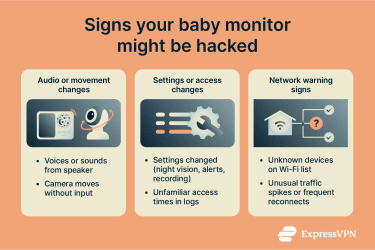
Strange noises, voices, or unexpected camera movement
- Voice coming through the monitor’s speaker: Many internet-connected cameras and monitors support two-way talk, so an intruder who gets access can use that feature. Real-world incidents are rare, but a notable case involved strangers speaking through in-home cameras.
- Pan or tilt movement you didn’t trigger: If the camera physically moves without anyone using the app, it can be a sign of remote control. It can also be motion tracking or an “auto-pan” feature, so the key detail is whether it matches the settings.
- Quick sanity checks: After checking whether two-way talk is enabled or if motion tracking is turned on, turn to your router. Modern routers often have dedicated apps you can use to check currently connected devices, so you can inspect for anything unfamiliar.
Sudden settings changes or device behavior
- Settings flip without explanation: Examples include night vision mode, motion alerts, recording settings, or remote viewing toggles changing between uses.
- Strange logs and unknown access times: If the monitor has an app or admin page, you might be able to access logs, where unfamiliar IP addresses or access times (that don’t match normal household use) might appear.
Network activity spikes and other technical indicators
- Unknown devices on the Wi-Fi network: If a baby monitor is Wi-Fi-based, a compromise may appear as unfamiliar clients on the router’s connected-device list. That means you’ll need to check your router’s interface for connected devices. To see how that’s done, it’s best to search for your router model’s manual online.
- Internet performance changes that correlate with the monitor: A steady increase in upstream traffic, Wi-Fi instability, or repeated reconnects can be a clue.
What to do if you suspect a breach
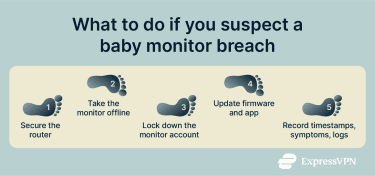
In the case of a possible breach, the response is essentially two steps. First, shut down any ongoing access by securing your network and accounts. Then, once everything is locked down, you can reset and rebuild the setup so you’re confident there are no exposed settings or unknown devices still connected.
- Take the baby monitor offline: Unplug it or disable its internet connection to stop remote access immediately.
- Secure the router first: Per your router’s manual, access its admin through a web browser. Then, change the router’s username and password, and change the Wi-Fi name to something unique. Also, enable Wi-Fi Protected Access 3 (WPA3) or WPA2 encryption.
- Lock down the monitor account and app access: Change the account password and sign out of other devices.
- Update the monitor firmware and the mobile app: Check if there’s a new version of firmware for your baby monitor to make sure you have the latest security updates. Do the same for the mobile app on your smartphone.
- Record what happened: Write down timestamps and what you observed (voices, camera movement, settings changes, etc.). If the device offers access logs, pull them before resetting anything.
How to secure your baby monitor and home network
If you’re setting up a new monitor or tightening security on one you already use, here’s where to start and how to make sure the baby monitor is properly secured.
Setting strong passwords and updating default credentials
Two different passwords protect two different parts of the system: the baby monitor account (the app or cloud login) and the router admin password (the one that controls network settings). Update both, and keep them long and unique: simple passphrases of 15+ characters are much stronger than short, “complex-looking” passwords. You can use a password manager to create strong passwords and store them securely.
If the monitor has its own device login or local admin page, change any factory default credentials as soon as possible. If the app supports it, avoid sharing a single household account and give each adult a separate login instead. Turn on 2FA or MFA if the app offers it, and periodically review the list of devices signed in to your account so you can remove old phones or unfamiliar sessions.
Best practices for Wi-Fi security
To protect your baby monitor from network-level attacks, here are steps that can help reduce how easily anyone outside your home can reach your devices.
- Use modern encryption: Set Wi-Fi security to WPA3-Personal when available, or WPA2 if not. Avoid open networks and legacy options like WEP.
- Disable convenience features that widen exposure: Turn off remote management, WPS, and UPnP, and remove any port forwarding rules. If you want a deeper router hardening checklist, check our guide on how to secure your home Wi-Fi network.
- Put smart devices on a separate network: Use a dedicated network for the monitor and other smart home devices so they are separated from laptops and phones that store sensitive data.
- Keep the router firewall enabled: Most routers include a built-in firewall, and it should stay on.
Keeping firmware updated and monitoring device activity
Turn on automatic updates for the router and monitor where possible. If a device no longer receives updates from the manufacturer, plan to replace it, as active support is part of staying secure. It also helps to check the router’s list of connected devices every so often. Rename devices so they’re easy to recognize, and remove anything you don’t recognize.
Use a VPN to protect your baby monitor connection
If you need to check the monitor while you’re away from home, a virtual private network (VPN) can help keep your connection private on public Wi-Fi. With most cloud-connected baby monitors, the video stream travels through the manufacturer’s servers, so turning on a VPN on your phone protects your side of that connection, as it makes it harder for someone on the same public network to snoop on your traffic.
FAQ: Common questions about detecting baby monitor hacking
Can baby monitors really be hacked?
Yes. If a baby monitor connects to Wi-Fi or uses a cloud account, it can be accessed through the same routes attackers use on other Internet of Things (IoT) devices. The most common paths leading to baby monitor hacking situations are weak or reused passwords, stolen account credentials, exposed remote access settings on the home network, or outdated firmware that has known issues.
How can I tell if my baby monitor is hacked?
The clearest signs are actions that don’t align with the monitor’s settings or normal behavior, especially when they recur. Examples include voices coming through two-way audio you didn’t trigger, camera movement when motion tracking is disabled, settings changing on their own, and account activity that shows unfamiliar devices or access times.
What should I do immediately if I suspect hacking?
Start by cutting off access, then secure the accounts and network the monitor depends on. Take the monitor offline, change the monitor account password, and enable multi-factor authentication (MFA) if it’s available. After that, change the Wi-Fi password and the router admin password, disable features like remote administration and Universal Plug and Play (UPnP) if they are enabled, and install firmware updates for the monitor, the app, and the router.
Are wireless monitors less secure than wired ones?
Often, yes, because wireless monitors add more entry points. Wi-Fi security depends on the router configuration and the strength of the network password, and many wireless monitors also rely on cloud accounts for remote viewing. A wired monitor can still have weaknesses, but removing Wi-Fi and cloud dependency usually reduces the number of ways an attacker can reach the device.
Can I use a VPN to make the baby monitor safer?
A virtual private network (VPN) can help in specific setups, but it is not a fix for weak passwords, compromised accounts, or outdated firmware. The main security benefit is avoiding risky remote access methods like port forwarding by using a VPN on the home router to access the home network securely from outside. A VPN can also protect the phone’s connection when viewing the monitor app on public Wi-Fi, but it does not automatically secure the monitor’s own connection to its cloud service at home.
Take the first step to protect yourself online. Try ExpressVPN risk-free.
Get ExpressVPN