VoIP VPN: How ExpressVPN protects your internet calls


ExpressVPN helps protect Voice over Internet Protocol (VoIP) calls by routing your traffic through an encrypted virtual private network (VPN) connection and masking your public IP address. This helps protect your call data from people monitoring your network while limiting what others can learn about your connection.
Quick guide: How to use ExpressVPN for VoIP calls in 3 steps
-
Get ExpressVPN: Sign up, download ExpressVPN, and log into your account.
-
Connect to a VPN server: Choose a nearby server location, then click or tap the power button. Wait until ExpressVPN shows Protected.
-
Start your call: Open your calling app or website and make a call as usual.
What changes when you use ExpressVPN for VoIP calls?
When you use ExpressVPN for VoIP calls, your calling app handles the call itself, including any encryption it provides. ExpressVPN protects your network connection while you make that call.
Your VoIP traffic is encrypted
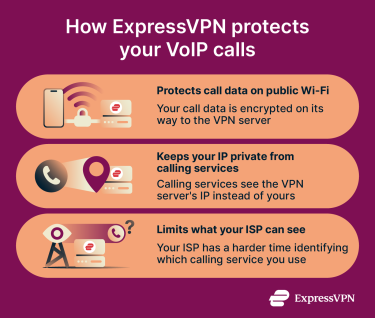
When you make a VoIP call, the calling app exchanges information with its service to set up and manage the connection. ExpressVPN encrypts this information, along with the call's audio and video, as it travels between your device and an ExpressVPN server.
Your public IP address gets masked
With ExpressVPN connected, the calling service sees the VPN server's IP address instead of your own. This makes it harder to estimate your location or link your calls to your usual internet connection.
Your calling service is harder to identify
Without a VPN, your internet provider or Wi-Fi operator may be able to identify which calling service you're using from the IP addresses your app connects to. With ExpressVPN connected, they see the VPN server's IP address instead.
When is ExpressVPN useful for VoIP calls?
ExpressVPN can help when you want more privacy during VoIP calls on home Wi-Fi, mobile data, or public networks.
Calling on public or shared Wi-Fi
If you regularly make VoIP calls on hotel, airport, or café Wi-Fi, you can enable ExpressVPN's auto-connect feature on supported devices. This lets ExpressVPN connect automatically when you join an untrusted network, so you don't have to remember to turn it on before making a call.
Calling on the move
When you leave a building during a call, your phone may switch from Wi-Fi to mobile data. When you're connected using ExpressVPN's Lightway protocol, the VPN session can resume quickly after a brief interruption, without starting a new connection.
If the VPN unexpectedly disconnects while your phone still has internet access, ExpressVPN's Internet Kill Switch blocks traffic until the VPN reconnects. This prevents your call traffic from being sent over an unprotected connection.
However, your call may still pause or end during an interruption. Depending on your calling app, you might need to reconnect the call yourself.
Add privacy to your VoIP calls
ExpressVPN encrypts your call traffic and masks your public IP address, helping protect your privacy whether you're calling from home or using public Wi-Fi.
Protect your calls with ExpressVPN
Get started with ExpressVPN, backed by a 30-day money-back guarantee for new users.
How to check ExpressVPN is working with VoIP
Before making a call in your browser, check that ExpressVPN is masking your IP address and that Web Real-Time Communication (WebRTC) isn't exposing your real one
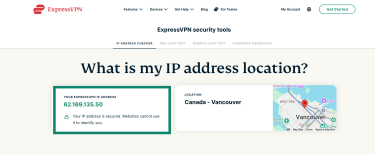
- Check your IP address: Connect to ExpressVPN and wait until the app shows Protected. Then, open the ExpressVPN IP address checker and look for a notice saying your IP address is secured. If the checker says your IP address is currently exposed, check that ExpressVPN is connected and refresh the page. If the warning remains, contact ExpressVPN Support.
- Check for WebRTC leaks: Keep ExpressVPN connected and open the WebRTC leak test in the browser you use for calls. Look for “No WebRTC leak detected” in the results.
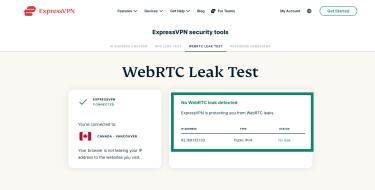
If you see warnings about your IP address being exposed, close any tabs you opened before connecting and run the test again in a new tab.
Common VoIP issues and how to fix them with ExpressVPN
If calls lag, cut out, or won't connect while ExpressVPN is on, work through these troubleshooting steps to identify the cause. Test your calls after each change to see whether the problem improves.
Compare calls with and without ExpressVPN
On a network you trust, make a short test call with ExpressVPN connected, then another with it disconnected. Use the same calling app, device, and network for both. If the problem happens only when ExpressVPN is connected, the VPN connection may be causing the issue. If it happens in both calls, check your internet connection or calling app before troubleshooting the VPN.
Try another VPN location
If the VPN is causing the issue, try connecting to another ExpressVPN location. If you’re on a distant server, try a nearby location. You can also use Smart Location on desktop or Fastest Location on Android and iOS to let ExpressVPN recommend a server location suited to your connection.
Check the VPN protocol
Your VPN protocol can affect connection speed and stability. A protocol that works well on one network may struggle on another. If you've manually selected a protocol, switch to Automatic so ExpressVPN can choose an option suited to your network.
If the problem continues, follow the instructions for changing your VPN protocol and test another available option. Keep the VPN location the same to help determine whether changing the protocol makes a difference.
Update your apps and contact Support
Install any available updates for your calling app and the ExpressVPN app, then test again.
If the problem continues and the issue is with the VPN, contact ExpressVPN Support. Provide information about your device, calling app, VPN location, protocol, and the results of your troubleshooting. You can also contact Support through the ExpressVPN app's Help section and provide diagnostic information to help investigate the issue.
What are the limitations of using ExpressVPN for VoIP calls?
ExpressVPN protects your network connection, but your calling app, device security, and internet connection still affect how private and reliable your calls are.
- ExpressVPN can't add end-to-end encryption (E2EE): If your calling app doesn't encrypt calls end-to-end, the service may still be able to access your conversations. ExpressVPN only encrypts the connection up to the VPN server.
- Doesn't hide your call history from the calling service: The service may still record who you called, when, and for how long. It can also link those records to your account.
- Can't stop malware from recording calls: Malware on your device may capture audio before ExpressVPN encrypts it or after your calling app decrypts it. ExpressVPN doesn't remove malware from your device.
- Can affect call quality: Routing traffic through a VPN server can add delay, particularly if the server is far away or your connection is slow. VPN encryption also uses some processing power and adds a small amount of data overhead, which may impact call quality on slower devices or connections.
FAQ
Is it legal to use ExpressVPN for VoIP services?
Using ExpressVPN for VoIP calls is legal in most countries, but some restrict VPNs, VoIP services, or both. Check local laws and your calling service's terms of use, especially when traveling.
Can ExpressVPN improve VoIP call quality?
Sometimes. If your internet provider deliberately slows VoIP traffic, ExpressVPN may help by making that traffic harder to identify. However, it can't fix weak Wi-Fi or an overloaded internet connection. Routing calls through a VPN server can also add delay.
Does ExpressVPN support VoIP?
Yes. ExpressVPN works with VoIP apps and browser-based calls. Connect to ExpressVPN, then make your calls as usual. Check your split tunneling settings to make sure your calling app or browser isn't excluded from the VPN.
Which ExpressVPN server location should I use for VoIP calls?
Start with a nearby ExpressVPN location or the one the app recommends. Nearby servers generally add less delay, but performance can vary. If your calls lag or cut out, try another location and compare the results.
Does ExpressVPN keep logs of my VoIP calls?
No. ExpressVPN doesn't log your call content or which calling services you use. It collects limited usage statistics, such as how many days you connect to the VPN, which VPN locations you use, and the total amount of data transferred. These records don't identify individual calls, although your calling service may keep its own call history.