Expressvpn Glossary
DNS port

What is a DNS port?
A network port is a numbered channel that helps computers direct various types of internet traffic to the correct service or application. A DNS port is the network port used by the Domain Name System (DNS) to send and receive queries.
How does a DNS port work?
DNS typically uses port 53, which allows devices, routers, and firewalls to recognize DNS packets and send them to the correct destination. Essentially, the port acts as an address or gate, ensuring that DNS requests reach the server and responses return to the right device.
Why are DNS ports important?
DNS ports allow devices to resolve domain names into IP addresses, which is essential for most internet activity, including browsing, email delivery, and app connectivity. Routers, for example, use port information to direct DNS requests to the correct server and return responses to the client. Incorrect port configuration can block network access or cause DNS failures, preventing devices from locating the correct server even when the network is functioning.
DNS ports also play a role in network management and security. Firewalls use port numbers to identify DNS traffic, distinguish queries from responses, route requests to the correct server and replies back to the client, and enforce security measures such as blocking unauthorized requests or filtering suspicious traffic. Virtual private networks (VPNs) rely on DNS ports to securely route queries and prevent leaks. Monitoring these ports can also help detect attacks such as DNS hijacking or unauthorized redirection by an internet service provider (ISP).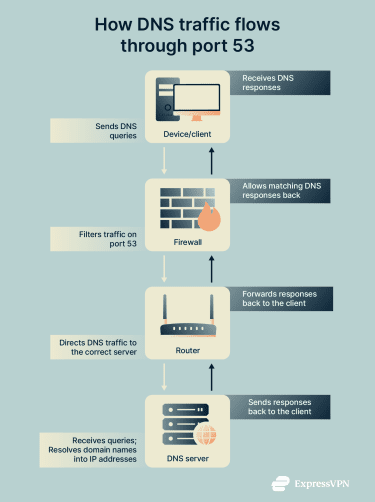
Types of DNS ports and protocols
In most cases, “DNS port” refers to port 53, the standard port assigned by the Internet Assigned Numbers Authority (IANA), which carries DNS traffic using two transport protocols: User Datagram Protocol (UDP) and Transmission Control Protocol (TCP).
UDP is used for most routine DNS requests because it’s fast and doesn’t require establishing a connection. This makes it suitable for simple lookups, such as translating a domain name into an IP address. But it’s not suitable for larger responses because UDP DNS packets typically have a size limit of 512 bytes, and the protocol doesn't guarantee that all data will arrive correctly or in order.
TCP is used when reliability or larger data transfers are required. This is because it ensures that all parts of a response are delivered correctly and in the right order. It also has a larger DNS packet size limit, which makes it suitable for larger DNS responses such as zone transfers (transferring all the records for a domain between servers).
Ports other than port 53 are sometimes used for specific purposes:
- Port 853: Used for DNS over TLS (DoT), which encrypts DNS traffic for improved privacy and security.
- Port 443: Used for DNS over HTTPS (DoH), sending DNS queries over HTTPS to protect them from interception and eavesdropping.
- Port 5353: Used for multicast DNS (mDNS), enabling devices on a local network to discover each other without a central DNS server.
DNS port security best practices
Port 53 is essential for internet functionality but is also a frequent target for attackers. Malicious actors may attempt to send unauthorized traffic, exploit vulnerabilities, or hide data within DNS queries. This makes proper security measures critical:
- Block unauthorized inbound requests on port 53: Only allow DNS traffic from trusted sources to reach DNS servers or devices.
- Allow only trusted resolvers through firewall rules: Restrict queries to known and authorized DNS resolvers to reduce the risk of misuse or hijacking.
- Use encrypted DNS protocols (DoT or DoH): Encryption prevents interception, tampering, and eavesdropping of DNS queries, improving privacy and security.
- Regularly update DNS software: Keeping DNS servers and software up to date helps address vulnerabilities and reduces exposure to attacks.
- Monitor for DNS tunneling and unusual outbound traffic: Suspicious query patterns, large responses, or unexpected domains can indicate attempts to exfiltrate data or communicate maliciously via DNS.
Further reading
- DHCP vs. DNS: Understanding key differences and functions
- What is DNS, and how does it work?
- What is my DNS? How to check and find your DNS server
- Types of DNS servers: Everything you need to know
FAQ
What is the default port number used by DNS?
The default port number for Domain Name System (DNS) is 53. This port is used for both sending queries and receiving responses between devices and DNS servers. That said, sometimes other ports are used for specific purposes.
Why does DNS use both UDP and TCP on port 53?
Domain Name System (DNS) uses the User Datagram Protocol (UDP) for most routine queries because it’s fast and doesn’t require establishing a connection. The Transmission Control Protocol (TCP) is used when reliability or larger data transfers are required, because it ensures all parts of a response arrive correctly and in order and can handle responses that exceed the size limit of UDP.
Are there other ports besides 53 that DNS uses?
Yes, Domain Name System (DNS) sometimes uses alternate ports for specific purposes. For example, port 853 is used for DNS over TLS (DoT) to encrypt queries and improve privacy, while port 5353 is used for multicast DNS (mDNS) to enable local network name discovery.
How does using a VPN affect DNS port traffic?
Using a VPN encrypts Domain Name System (DNS) queries and responses, often routing them through the VPN tunnel to prevent interception or leaks. This helps maintain privacy and security for DNS traffic, ensuring that queries aren’t visible to untrusted networks or internet service providers (ISPs).