Is Craigslist safe? How to stay protected when buying or selling


Craigslist is a popular, long-running online marketplace for buying and selling, browsing housing and job listings, and more. Because Craigslist connects users directly, it may attract scammers and fraudulent listings, even though most transactions are legitimate.
This guide outlines common Craigslist scams and safety risks, explains why they occur, and provides some practical ways to use the platform securely.
What is Craigslist, and how does it work?
Craigslist is a classified-ads website where people post and respond to listings for items for sale, housing, job opportunities, services, community events, and more. It was founded in the mid-1990s by Craig Newmark as a simple email list for local postings in the San Francisco Bay Area and soon evolved into a web-based classifieds platform with separate regional and city-specific pages around the world.
Listings are organized by location and category. In many categories, people often arrange transactions locally, meeting face-to-face or coordinating pickup directly. Craigslist doesn't process payments, ship items, or mediate deals. After initial contact, users typically negotiate price, payment method, and logistics directly.
Why people generally use Craigslist today
Despite newer marketplace apps, Craigslist remains a go-to for many people because of a few simple reasons:
- Location-specific: Craigslist is divided into local sites for different cities and regions. You can find your closest Craigslist site by zooming in on the map or by clicking a region link above the map and browsing the list. Listings are tied to a specific local site. Posting to the wrong site means starting over, and posts can’t be moved to another location after they’re created.
- Variety of listings: Craigslist offers listings across many categories, including electronics, cars, housing and rentals, jobs, and gigs.
- No/low cost: Most Craigslist postings are free, but certain categories and regions charge a fee. Examples include job postings, apartment rentals in select metro areas, commercial real estate, some vehicle listings, and certain gigs and services posts.
- Privacy: Creating an account typically only requires an email and password, and some posts may require phone verification. It also has a policy of no unsolicited marketing communications.
- Simple design: The website's minimal layout loads quickly and is easy to navigate. It’s even possible to use the site with a low-resource device or a slow internet connection.
- Face-to-face transactions: Craigslist is often used for local in-person exchanges, which some people might prefer to remote sales on typical e-commerce sites.
- No targeted marketing: Craigslist states that it doesn’t run traditional ads or use marketing trackers.
- Community features: Some local sites include community posts and discussion forums, in addition to buying and selling.
Is Craigslist safe to use?
Craigslist is a legitimate advertising website with over 120 million monthly visits and can be safe to use, but it depends a lot on how you interact with listings. Because the platform connects people directly and doesn’t run a built-in checkout or verification system (other than verifying your phone number and/or email), it can attract scam attempts alongside legitimate posts.
Official Craigslist safety policies and limitations
Here are some of the steps Craigslist takes to protect its users:
- Craigslist Mail Relay: Craigslist creates a randomized email address for each posting. Replies go to that address instead of revealing your real email address. However, your name and any contact details you include in the message body are still visible to the other person.
- Prohibited items: Craigslist bans a wide range of listings and content, including most weapons and explosives, prescription drugs, alcohol and tobacco, pet sales, stolen or counterfeit goods, fraud, or deceptive posts, and listings that share personal or identifying information. Users are encouraged to flag any violations they come across.
- Flagging system: Users can flag prohibited posts using the flag link on a listing. Posts that receive enough flags may be removed automatically, and Craigslist may also remove listings through staff review or automated systems. If a compliant post is removed by mistake, it can be reposted (with edits if needed).
- Limited external links: Craigslist limits the use of external links and HTML in many categories to reduce spam and promotional content; clickable links are often unsupported or treated as unsupported HTML, and posts that appear spammy, including those with external marketing links, can be flagged or removed.
- Reporting: Craigslist encourages users to flag suspicious posts and emails that might be scams, spam, or otherwise violate its terms of use (TOU). You can submit a report to Craigslist through its contact form, and (if there’s fraud, threats, or another serious offence), you can also report it to the appropriate authorities as well.
- Paid posting payments: Craigslist accepts credit cards for specific paid postings (such as job ads) and invoice payments, and says its online credit card payment forms are encrypted using industry-standard Secure Sockets Layer (SSL). This applies to payments made to Craigslist, not user-to-user transactions.
How Craigslist compares to other marketplaces
Here’s a quick comparison of how Craigslist differs from other popular platforms (Amazon, eBay, and Facebook Marketplace) in what is allowed, how transactions work, and what protections they provide.
| Craigslist | Amazon | eBay | Facebook Marketplace | |
| Types of listings | Broad classifieds (goods, services, jobs, housing, community, etc.) | Retail marketplace catalog (products sold by Amazon and third-party sellers; physical and digital items) | Marketplace plus classified ads (auctions and fixed-price items; vehicles and local pickup listings) | Peer-to-peer goods listings (primarily local items; select categories) |
| Fulfillment | No shipping or delivery support; transactions are arranged directly between users | Self-fulfillment or end-to-end fulfillment via Fulfillment by Amazon (FBA) | Self-fulfillment, drop shipping, or international shipping through eBay | Self-arranged local pickup or optional delivery via Facebook Marketplace partners (where available) |
| Buyer feedback | No public ratings; relies on user flagging for moderation | Seller and product ratings and reviews are visible on listings | Seller ratings, buyer feedback scores, and product reviews | Seller ratings and reviews may be visible, depending on the listing and transaction type |
| User verification | Basic verification for some posts (email or phone); no universal ID checks | Seller verification requires photo ID, bank statements, business license, and the location of the business for tax; the buyer transacts through an Amazon account | Verifies a seller's phone number and email, banking details, and personal and business information | Uses Facebook account identity; optional seller verification for shipping payments |
| Payments | No built-in payment system; users handle payments off-platform | Integrated checkout with established payment methods | Integrated checkout with established payment methods | Self-arranged or in-app checkout for eligible items |
| Refunds and returns | None; disputes are handled privately | Platform-mediated refunds and returns via A-to-Z Guarantee | Platform-mediated refunds, returns, and disputes via eBay Money Back Guarantee | Purchase protection for eligible in-app payments; excludes local, in-person deals |
Learn more: Read our detailed guides on how to stay safe on Amazon, eBay, and Facebook Marketplace.
Common Craigslist scams to watch for
Scams on Craigslist can affect both buyers and sellers, and many of them share common traits. Urgent messages, pressure to act quickly, and early requests for payment or personal information are recurring themes.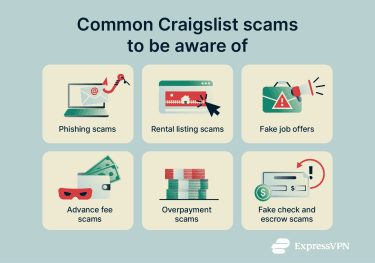
Phishing scams
Phishing scams aim to collect sensitive information such as account details, passwords, or financial data. On Craigslist, these scams might appear as fake “customer support” messages or messages posing as other users, claiming there’s a problem with your account or a specific posting. The message may include a link to a look-alike website, a request for a “verification” code, or prompts to fill out a form or download an attachment.
Some phishing attempts may lead to fake online stores, designed to resemble Craigslist, where users might be asked to enter login credentials or payment information. Craigslist cautions against sharing sensitive or financial information or exchanging payments before meeting in person, noting that legitimate Craigslist interactions don’t require this kind of information upfront.
Rental scams
Rental scams typically involve a fake or misleading listing where the “landlord” or “agent” isn’t authorized to rent the property. These posts are designed to extract money or personal information before the listing can be adequately verified.
Common tactics might include requests for upfront “application fees,” deposits, or first month’s rent, promoting one property and then redirecting interest to a different listing, or steering renters toward “free” credit report services that later enroll them in paid subscriptions.
To appear legitimate, rental scammers might reuse photos and descriptions from real listings, sometimes pricing them below market to prompt quick responses. Claims of multiple interested renters are also common, particularly in cities where housing demand is high and affordable options are limited.
Fake job listings
Job scams often take advantage of the fact that legitimate employers typically request information during hiring. In scam listings, this can escalate quickly to requests for sensitive details, such as bank information, tax data, or copies of government-issued IDs, before any real interview or verified company contact.
The underlying goal may be identity theft, account takeover, or direct financial fraud. One common variation is the "money mule" scheme, where victims are asked to receive and forward payments to help criminals move illicit funds.
When a listing claims to represent a real company, scammers may rely on the company’s name to appear credible. Public sources such as official company websites, Better Business Bureau (BBB) listings, or employee reviews on Glassdoor can be used to assess whether a role appears legitimate.
Advance fee and overpayment scams
Advance fee scams often involve requests for up-front payments, such as deposits or “holding fees,” typically via hard-to-reverse methods like wire transfers, Western Union, or MoneyGram.
Scammers may apply pressure by citing unusually low prices, limited availability, or multiple interested buyers. After payment is sent, communication typically stops, and the promised item or service never materializes.
Overpayment scams work in reverse. A “buyer” claims they paid more than the agreed amount (or included extra fees) and asks you to refund the difference, sometimes pointing to a pending or fake payment. Once the refund is sent, the original payment fails or is reversed, leaving the seller out of pocket.
Fake check and escrow scams
These scams generally start with a long-distance buyer or renter who wants to proceed sight unseen. They may insist on using an escrow service to make the deal feel “safe,” but Craigslist warns that escrow requests can be a scam.
Another variation involves a realistic-looking cashier’s check, sometimes written for more than the agreed amount, followed by a request to wire the “balance” back via a money transfer service. Although banks may initially credit the funds, the check can later be found counterfeit, leaving the recipient responsible.
How to identify a Craigslist scam
While Craigslist scams take many forms, they often follow similar patterns across listings, messages, and payment requests
Common red flags to look for in listings
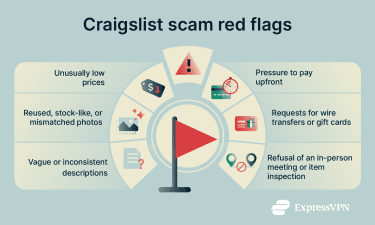 Many scams rely on “too good to be true” hooks. Patterns often include:
- Prices well below comparable listings.
- Pushing for payment before details are confirmed or before a meeting.
- Requesting hard-to-reverse payment methods, like wire transfers or gift cards.
- Items described as being in flawless condition despite normal wear.
- Vague or inconsistent details.
- Photos that appear reused, stock-like, or mismatched to the description.
- High pay for minimum qualifications in job listings.
Writing quality can vary widely on Craigslist, so spelling or grammar issues alone aren’t a reliable indicator of a scam.
Suspicious buyer or seller behavior
Scam messages on Craigslist often follow familiar patterns. Examples published by Craigslist include messages that create urgency, reference well-known companies, lean on emotional backstories, promote “too good to be true” prices, or push for shipping and remote payment rather than meeting in person. Some messages also frame a payment method as “safe” to build trust.
Craigslist also highlights scam texts that claim an account has been flagged or reported and request personal information to “verify” it. These messages can be reported by forwarding them to 7726 (SPAM), a shortcode supported by major mobile carriers.
Other commonly reported warning signs include reluctance to share basic listing details, avoiding voice or video contact, frequent last-minute changes, pressure to move quickly or pay early, refusal to provide reasonable proof of ownership for high-value items, unusual delivery or escrow arrangements, and overly detailed explanations used to smooth over inconsistencies.
Craigslist safety tips: How to protect yourself
Buy from nearby sellers
Craigslist recommends face-to-face transactions as the most effective way to avoid most scam attempts. It also warns against off-platform arrangements that are common in long-distance transactions, such as paying before meeting, wiring money, depositing cashier’s checks, or using an escrow service.
Avoid clicking external links or attachments
Craigslist’s scam guidance highlights unexpected requests to move conversations off the platform as a common warning sign. This often includes messages that ask recipients to log in through a link, share a verification code, complete a form on another site, or download an attachment.
In cases where someone believes they may have interacted with a phishing attempt, standard guidance includes updating account credentials and reporting the message.
Do your research
Craigslist generally doesn’t verify listings or users, which means evaluating a post is primarily left to the people involved.
In practice, this often includes comparing prices and details with similar listings, checking whether photos appear elsewhere online, noting how specific and consistent the description is, and confirming that an item matches the listing when viewed in person.
Should you use a VPN when browsing Craigslist?
Using a virtual private network (VPN) isn’t required to browse Craigslist, but it can add a layer of protection against online threats. A VPN encrypts your internet connection and changes your IP address, which makes it harder to monitor your traffic, particularly on public Wi-Fi. While this doesn’t prevent scams or misleading listings, it can reduce exposure to some broader online risks.
Some VPNs also include tools that block connections to known malicious or tracking domains. For example, ExpressVPN’s Threat Manager prevents apps and websites from connecting to domains associated with malware, trackers, or other suspicious activity. This may help if a scam attempt includes links to known phishing or malware sites, though it isn’t a substitute for carefully evaluating listings or messages.
FAQ: Common questions about Craigslist safety
What should I avoid on Craigslist?
Common warning signs on Craigslist include offers that seem unusually good, requests involving advance payments or checks, and situations where the other party avoids meeting in person. These patterns often appear in scam listings, especially when transactions are pushed off-platform or handled remotely.
How can I protect myself on Craigslist?
Craigslist’s safety guidance focuses on reducing risk in direct transactions. This typically involves minimizing the amount of personal or financial information shared and using payment methods that offer traceability or the potential for recovery if something goes wrong.
Is Craigslist legal and trustworthy?
Craigslist is a legitimate classified-ads platform used in many countries for posting jobs, housing, goods, and services. The site is primarily built around user-generated listings and generally doesn’t verify users or posts. While many transactions on Craigslist are legitimate, fraudulent listings and scams also appear, meaning trustworthiness depends more on the specific listing and the person behind it than on the platform itself.
Is it safe to buy a car on Craigslist?
Buying a car on Craigslist can be safe, but it typically involves more risk than buying from a licensed dealer. Most vehicle listings on Craigslist are unverified, and many sales are handled directly between private parties.
What should I do if I get scammed?
When a scam occurs, the next steps typically involve preserving records and reporting the incident. This can include saving the listing, messages, emails, phone numbers, screenshots, receipts, and any payment details, then flagging the post to Craigslist and filing a report with local authorities or a consumer-protection agency.
If payment was made by card, bank transfer, or a payment app, contacting the provider promptly may help resolve disputes or initiate a reversal. Updating passwords or account details is also commonly recommended if any information may have been exposed.
Take the first step to protect yourself online. Try ExpressVPN risk-free.
Get ExpressVPN