

ExpressVPN
    • นโยบายต่อต้านการบันทึก
    • Servers in 113 Countries
    • Use on Multiple Devices
    • High-Speed VPN
    • Access Online Services Securely
    • เล่นเกมด้วย VPN
    • สำรวจคุณสมบัติทั้งหมด
    • เกี่ยวกับ ExpressVPN
    Sign Up For Expressvpn

    One subscription gives you access to a fast-growing suite of privacy and security tools that work seamlessly together to improve your digital life.

    View all products
    • โปรโตคอล Lightway VPN
    • Internet Kill Switch
    • Split Tunneling
    • Private, Encrypted DNS
    • Avoid ISP Throttling
    • Threat Manager
    • ตัวบล็อกโฆษณา
    • การควบคุมโดยผู้ปกครอง
    • IP เฉพาะ
  • ดาวน์โหลด VPN
    • Windows new
    • MacOS new
    • Linux new
    • iPhone / iPad
    • Android
    • Apple TV
    • Fire Stick
    • Android TV
    • VPN สำหรับ เราเตอร์
    • เราเตอร์ Aircove
    • Chrome
    • Firefox
    • Edge
  • Pricing
    • VPN คืออะไร?
    • VPN for Beginners
    • How To Use a VPN
    • VPN Encryption Explained
    • บล็อก
    • Glossary
    • IP Address Checker
    • การทดสอบการรั่วไหล DNS
    • การทดสอบการรั่วไหล WebRTC
    • เครื่องมือช่วยสร้างรหัสผ่าน
    • ศูนย์สนับสนุน
    • คำถามที่พบบ่อย
    • ไลฟ์แชท
    • สาธิตการตั้งค่า VPN
    • Redemption Code
  • Icon10VPN for Teams
  • ผลิตภัณฑ์
    Icon11

    ExpressVPN for Teams Get fast, secure VPN protection for growing teams. Easy to deploy, simple to manage, built to scale.

    Img2
    • ExpressVPN

      ExpressVPN Industry-leading, ultra-fast VPN with secure servers in 113 countries.

    • ExpressMailGuard

      ExpressMailGuard Private email relay service to protect your inbox and identity.

    • ExpressKeys

      ExpressKeys Secure password management, multi-factor authentication, and more.

    • ExpressAI

      ExpressAI The first consumer AI powered by confidential computing for privacy-led intelligence.

    • Identity Defender

      Identity Defender Powerful suite of ID protection, monitoring, and data removal tools

    Other products from the family behind ExpressVPN

    • holiday.com eSIM

      holiday.com eSIM Unlimited data with a single eSIM across 150+ destinations.

    • Intego

      Intego Award-winning macOS antivirus, firewall, system tools, and more.

  • บัญชีของฉัน
เริ่มต้น
ExpressVPN
    • นโยบายต่อต้านการบันทึก
    • Servers in 113 Countries
    • Use on Multiple Devices
    • High-Speed VPN
    • Access Online Services Securely
    • เล่นเกมด้วย VPN
    • สำรวจคุณสมบัติทั้งหมด
    • เกี่ยวกับ ExpressVPN
    Sign Up For Expressvpn

    One subscription gives you access to a fast-growing suite of privacy and security tools that work seamlessly together to improve your digital life.

    View all products
    • โปรโตคอล Lightway VPN
    • Internet Kill Switch
    • Split Tunneling
    • Private, Encrypted DNS
    • Avoid ISP Throttling
    • Threat Manager
    • ตัวบล็อกโฆษณา
    • การควบคุมโดยผู้ปกครอง
    • IP เฉพาะ
  • ดาวน์โหลด VPN
    • Windows new
    • MacOS new
    • Linux new
    • iPhone / iPad
    • Android
    • Apple TV
    • Fire Stick
    • Android TV
    • VPN สำหรับ เราเตอร์
    • เราเตอร์ Aircove
    • Chrome
    • Firefox
    • Edge
  • Pricing
    • VPN คืออะไร?
    • VPN for Beginners
    • How To Use a VPN
    • VPN Encryption Explained
    • บล็อก
    • Glossary
    • IP Address Checker
    • การทดสอบการรั่วไหล DNS
    • การทดสอบการรั่วไหล WebRTC
    • เครื่องมือช่วยสร้างรหัสผ่าน
    • ศูนย์สนับสนุน
    • คำถามที่พบบ่อย
    • ไลฟ์แชท
    • สาธิตการตั้งค่า VPN
    • Redemption Code
  • VPN for Teams
  • ผลิตภัณฑ์
    • ExpressVPN

      ExpressVPN Industry-leading, ultra-fast VPN with secure servers in 113 countries.

    • ExpressMailGuard

      ExpressMailGuard Private email relay service to protect your inbox and identity.

    • ExpressKeys

      ExpressKeys Secure password management, multi-factor authentication, and more.

    • ExpressAI

      ExpressAI The first consumer AI powered by confidential computing for privacy-led intelligence.

    • Identity Defender

      Identity Defender Powerful suite of ID protection, monitoring, and data removal tools

    Other products from the family behind ExpressVPN

    • holiday.com eSIM

      holiday.com eSIM Unlimited data with a single eSIM across 150+ destinations.

    • Intego

      Intego Award-winning macOS antivirus, firewall, system tools, and more.

    Icon11

    ExpressVPN for Teams Get fast, secure VPN protection for growing teams. Easy to deploy, simple to manage, built to scale.

    Img2
  • บัญชีของฉัน
เริ่มต้น
Home Home » วิธีดาวน์โหลดและติดตั้ง ExpressVPN

ศูนย์รวมความรู้

วิธีดาวน์โหลดและติดตั้ง ExpressVPN

อัปเดตล่าสุด: 26/08/2026

Share in FacebookShare in TwitterShare in WhatsappShare in TelegramShare by email

สำหรับการใช้งานแอปของเราและการตั้งค่า โปรด ลงชื่อเข้าใช้บัญชี ExpressVPN ก่อน

คู่มือนี้จะแสดง วิธีดาวน์โหลดและติดตั้งแอป ExpresVPN บนอุปกรณ์ของคุณ ExpressVPN นั้นเปิดให้ดาวน์โหลดได้ฟรี แต่คุณจะต้องมี การสมัครสมาชิก ExpressVPN ถึงจะใช้ VPN และคุณสมบัติอื่น ๆ ได้

ขั้นตอนการดาวน์โหลดและติดตั้งจะแตกต่างกันออกไปสำหรับอุปกรณ์แต่ละเครื่อง อ้างอิงขั้นตอนที่สอดคล้องกับอุปกรณ์ของคุณด้านล่าง

ข้ามไปที่… :

  • Windows, Mac หรือ Linux
  • Android
  • iOS

ดาวน์โหลดและติดตั้ง ExpressVPN บน Windows, Mac หรือ Linux

1. เข้าสู่ระบบบัญชีของคุณ

เข้าไปที่ แดชบอร์ดบัญชี ExpressVPN ถ้ามีถาม ให้คุณกรอกอีเมลและคลิกที่ Send Code (ส่งรหัส)
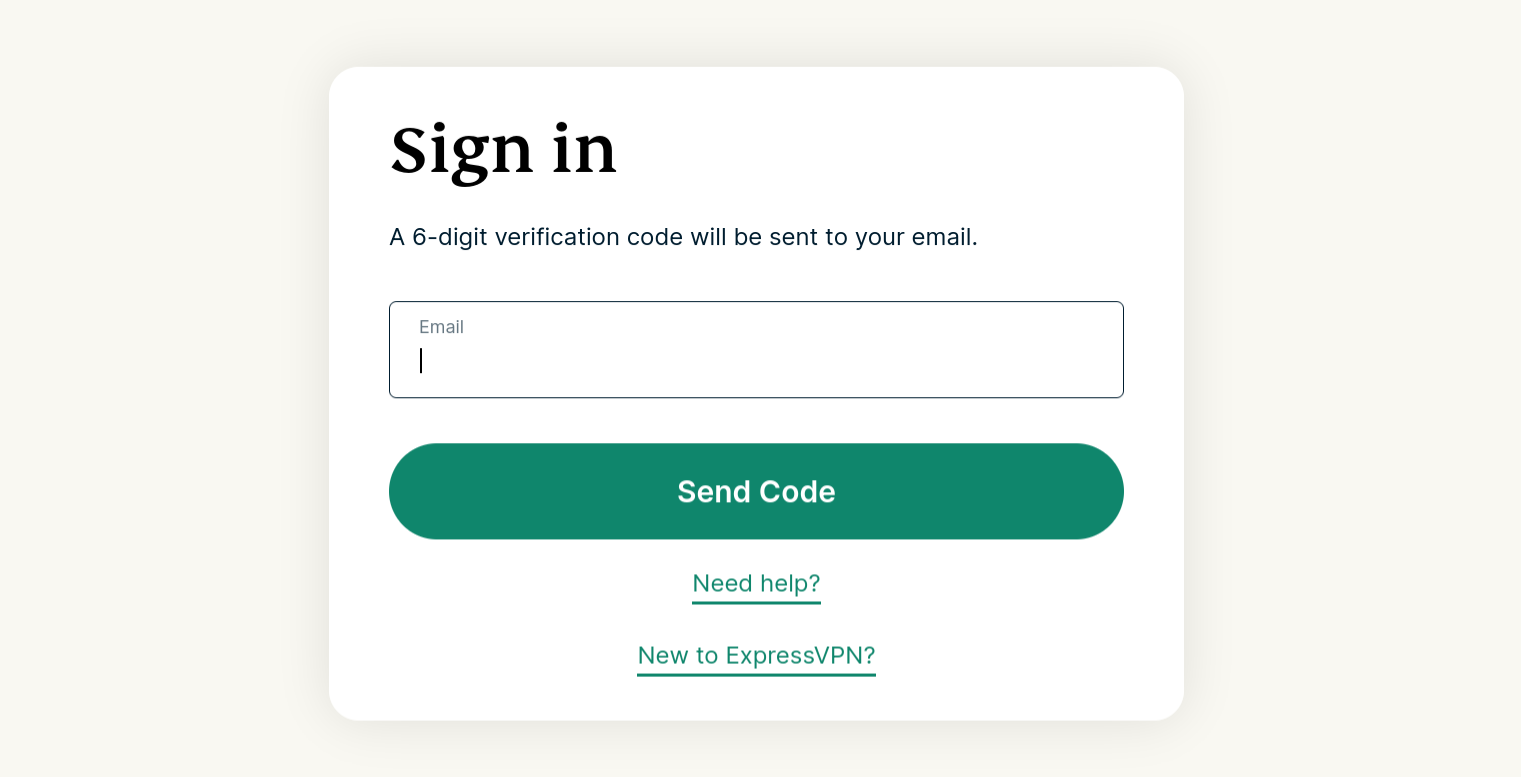
ExpressVPN sign in page requesting email credentials.

กรอกรหัสยืนยัน ที่ถูกส่งไปยังอีเมลของคุณเพื่อทำการยืนยัน

2. ดาวน์โหลดแอป VPN

จากเมนูทางด้านซ้าย ให้ขยาย ACCOUNT (บัญชี) จากนั้นคลิกที่ Set Up Devices (ติดตั้งอุปกรณ์)
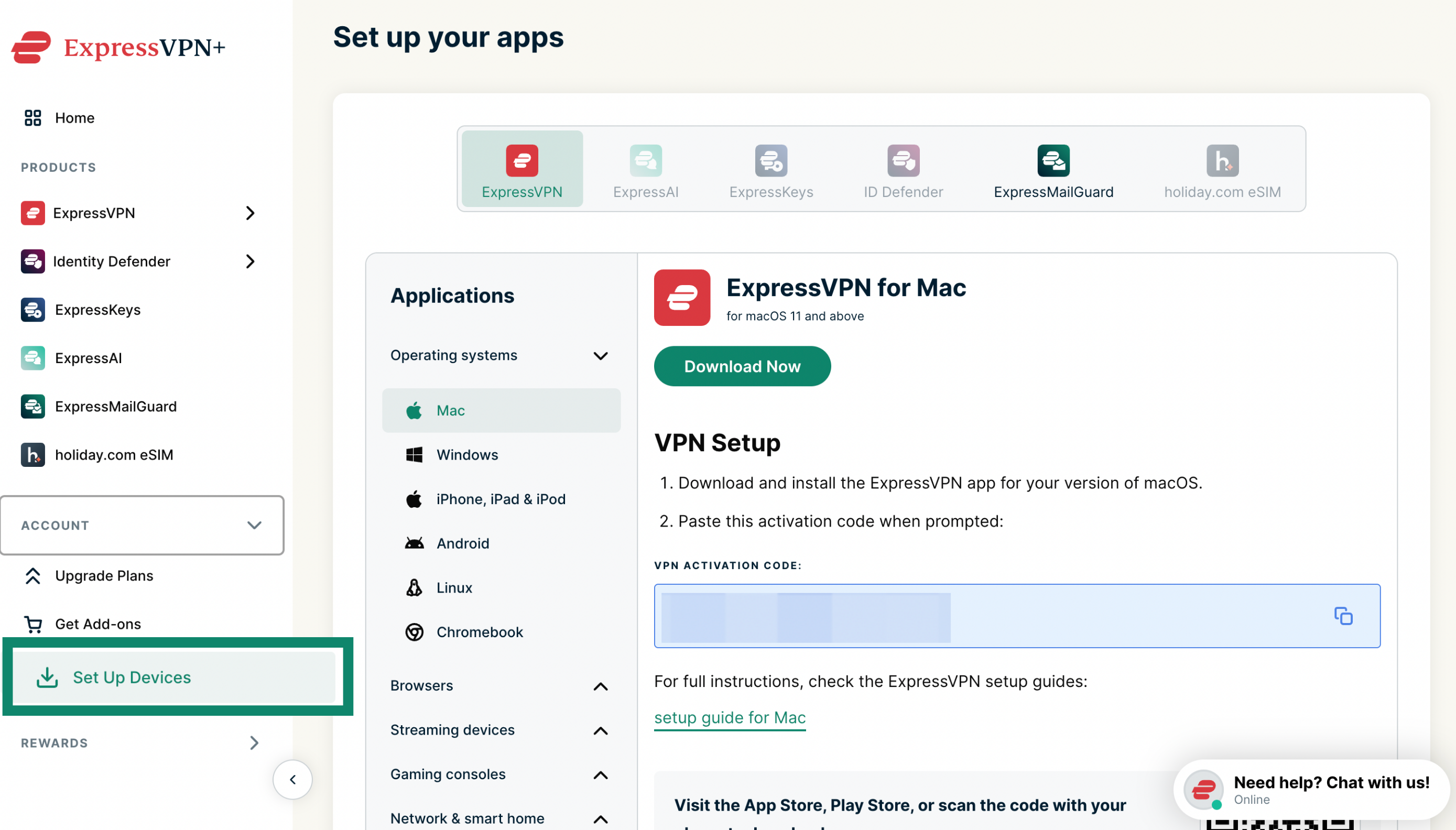
ExpressVPN+ portal setup page with Set Up Devices highlighted in the left menu.

ภายใต้ Applications (แอปพลิเคชัน) > Operating systems (ระบบปฏิบัติการ) ให้เลือก Windows, Mac หรือ Linux ตามอุปกรณ์ที่คุณใช้ จากนั้นคลิกที่ Download Now (ดาวน์โหลดตอนนี้)
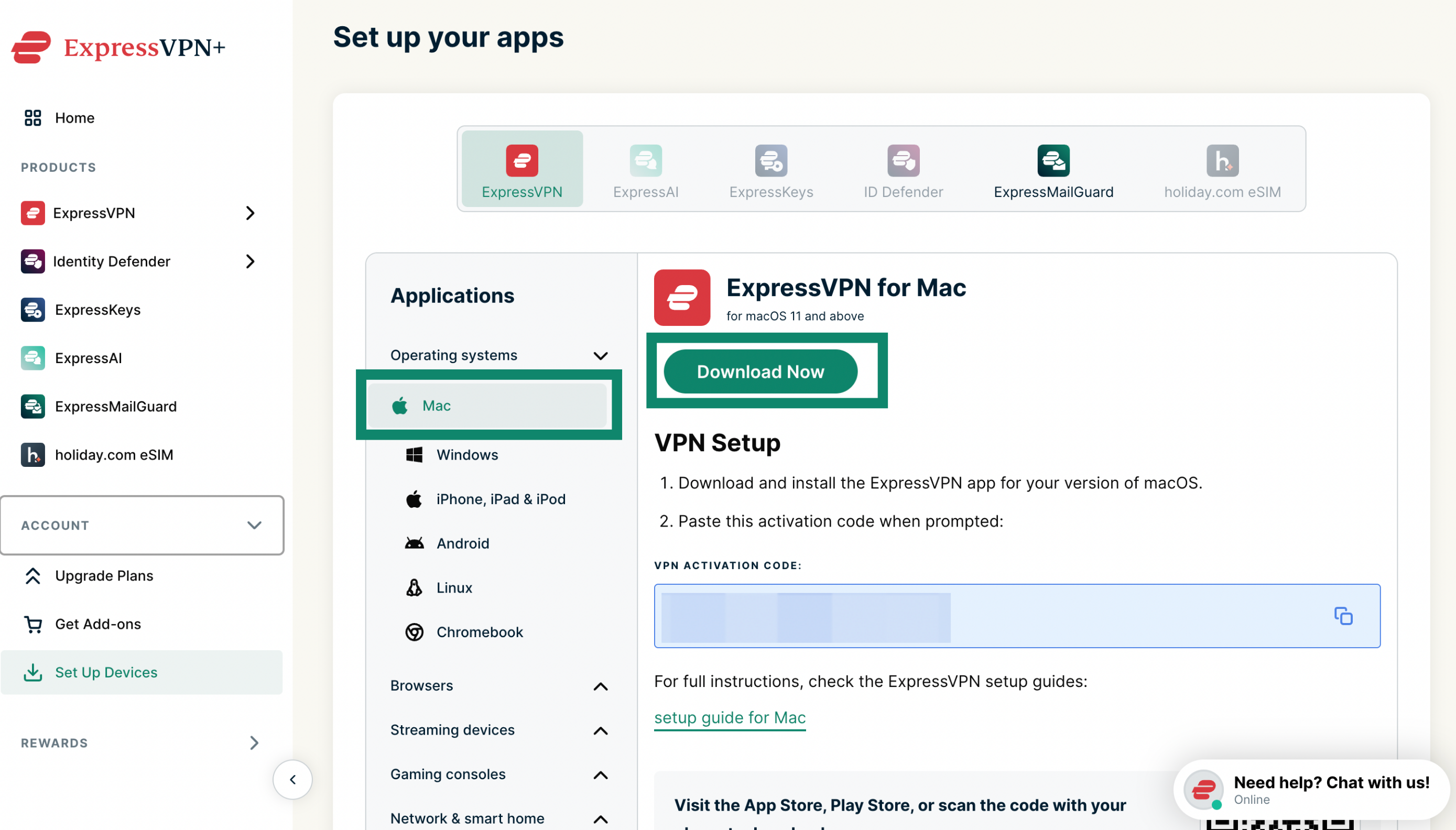
Set up your apps section in the ExpressVPN+ portal with the Download Now button highlighted for Mac.

เปิดหน้าต่างเบราว์เซอร์นี้เอาไว้ คุณจะต้องใช้รหัสเปิดใช้งานในภายหลัง
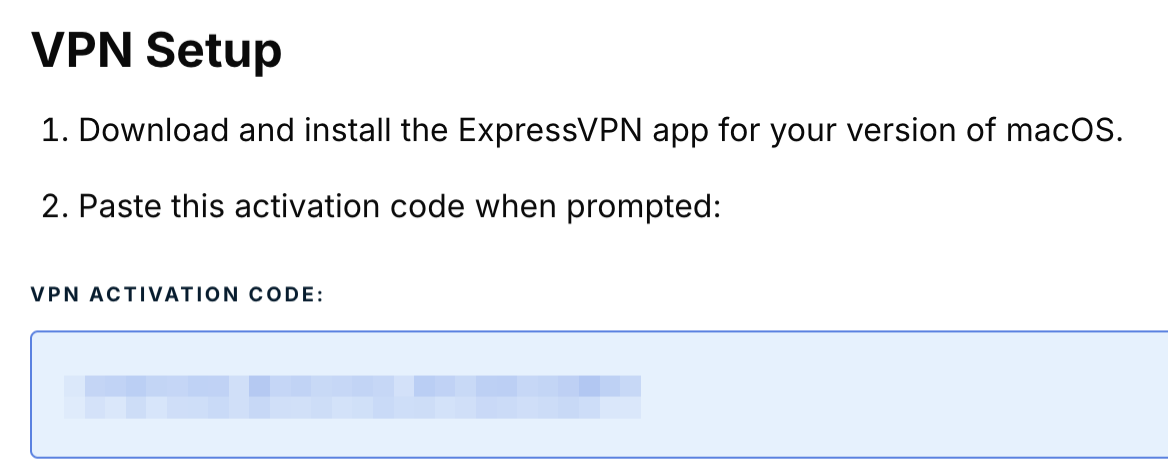
ExpressVPN setup activation code.

3. ติดตั้งแอป VPN

อ้างอิงขั้นตอนการติดตั้งสำหรับ :

  • ExpressVPN สำหรับ Windows
  • ExpressVPN สำหรับ Mac
  • ExpressVPN สำหรับ Linux

ต้องการความช่วยเหลือ? ติดต่อทีมสนับสนุนของ ExpressVPN เพื่อขอความช่วยเหลือในทันที

กลับไปด้านบน


ดาวน์โหลดและติดตั้ง ExpressVPN บน Android

ขั้นตอนต่อไปนี้มีไว้สำหรับอุปกรณ์มือถือ Android และอุปกรณ์ที่ใช้ระบบ Android เป็นพื้นฐาน อย่างเช่นChromebook

1. ดาวน์โหลดแอป VPN

ใน Google Play Store หรือ Galaxy Store ให้ค้นหา ExpressVPN แตะที่ ติดตั้ง

สำคัญ : ถ้าคุณไม่สามารถเข้าถึง Google Play Store หรือ Galaxy Store บนอุปกรณ์มือถือ Android ของคุณ คุณสามารถดาวน์โหลด APK โดยตรงแทนได้

2. ติดตั้งแอป VPN

อ้างอิงขั้นตอนการติดตั้ง ExpressVPN สำหรับ Android

ต้องการความช่วยเหลือ? ติดต่อทีมสนับสนุนของ ExpressVPN เพื่อขอความช่วยเหลือในทันที

กลับไปด้านบน


ดาวน์โหลดและติดตั้ง ExpressVPN บน iOS

1. ดาวน์โหลดแอป VPN

ใน App Store ให้ค้นหา ExpressVPN แตะที่ รับ

สำคัญ : ถ้าคุณไม่เห็น ExpressVPN ใน App Store คุณจะต้อง เปลี่ยนตำแหน่ง App Store ของคุณ ไปเป็นตำแหน่งที่มี ExpressVPN

2. ติดตั้งแอป VPN

อ้างอิงขั้นตอนการติดตั้ง ExpressVPN สำหรับ iOS

ต้องการความช่วยเหลือ? ติดต่อทีมสนับสนุนของ ExpressVPN เพื่อขอความช่วยเหลือในทันที

กลับไปด้านบน


วิธีเข้าสู่ระบบ ExpressVPN บนอุปกรณ์ต่าง ๆ

ในการจะเข้าสู่ระบบ ExpressVPN บนอุปกรณ์เหล่านี้ คุณจะต้องใช้ :

  • ที่อยู่อีเมลของคุณ
  • รหัสเปิดใช้งาน (สำหรับแอป ExpressVPN บน Windows, Mac, Linux หรือเราเตอร์)

ถ้าคุณประสบปัญหาในการเปิดใช้งานแอป ExpressVPN โปรดอ้างอิงคู่มือในการแก้ปัญหานี้

ต้องการความช่วยเหลือ? ติดต่อทีมสนับสนุนของ ExpressVPN เพื่อขอความช่วยเหลือในทันที

กลับไปด้านบน

Share in FacebookShare in TwitterShare in WhatsappShare in TelegramShare by email
บทความนี้มีประโยชน์หรือไม่?

เราเสียใจที่ได้ยินเรื่องนี้ โปรดบอกให้เราทราบว่าควรปรับปรุงอย่างไร

Please enter a valid email address.

เจ้าหน้าที่ฝ่ายสนับสนุนของเราจะติดต่อกลับเพื่อช่วยแก้ปัญหาของคุณ

Share in FacebookShare in TwitterShare in WhatsappShare in TelegramShare by email
  • มัลแวร์คืออะไร?
  • คีย์ความปลอดภัยเครือข่ายคืออะไร?
  • VPN ถูกกฎหมายหรือไม่?
  • วิธีเปลี่ยนตำแหน่งของคุณบน iPhone
  • รอยเท้าดิจิทัลคืออะไร?
  • จะใช้งาน VPN ร่วมกับ Tor เพื่อที่จะไม่เปิดเผยตัวตนบนโลกออนไลน์ได้อย่างไร
  • รับ VPN ที่ดีที่สุดสำหรับอุปกรณ์ต่าง ๆ
VPN สำหรับทุกอุปกรณ์
  • ดาวน์โหลด ExpressVPN
  • MacOS
  • Windows PC
  • iOS (iPhone และ iPad)
  • Android
  • Linux
  • เราเตอร์
  • Apple TV
  • Fire Stick
  • Android TV
  • ส่วนขยาย Chrome
ที่ตั้งเซิร์ฟเวอร์ VPN
  • เซิร์ฟเวอร์ใน 113 ประเทศ
  • VPN สหรัฐอเมริกา
  • VPN สหราชอาณาจักร
  • VPN แคนาดา
  • VPN ออสเตรเลีย
คุณสมบัติ
  • สำรวจคุณสมบัติทั้งหมด
  • การทดลองใช้ VPN ที่ปราศจากความเสี่ยง
  • แผนและราคา
ผลิตภัณฑ์
  • ExpressKeys
  • ExpressMailGuard
  • ExpressAI
เกี่ยวกับ ExpressVPN
  • เกี่ยวกับเรา
  • ศูนย์ความเชื่อถือ
  • ศูนย์สิทธิประโยชน์
  • การตรวจสอบความปลอดภัย
  • รีวิว ExpressVPN
  • ผู้เชี่ยวชาญของเรา
  • สื่อ
  • ร่วมงานกับเรา
โปรแกรม
  • ท็อตแน่ม ฮ็อทสเปอร์
  • Brooklyn Nets
  • มาเป็นพันธมิตรกับเรา
  • โปรแกรมพันธมิตร
  • อินฟลูเอนเซอร์
รับความช่วยเหลือ
  • สาธิตการตั้งค่า VPN
  • คำถามที่พบบ่อย
  • ซื้อ VPN
เรียนรู้เพิ่มเติม
  • VPN คืออะไร?
  • IP ของฉันคืออะไร?
  • ซ่อน IP ของฉัน
  • 5 สุดยอดการใช้งาน VPN
  • บล็อก

© 2026 ExpressVPN สงวนลิขสิทธิ์ทั้งหมด

  • นโยบายความเป็นส่วนตัว
  • งื่อนไขการให้บริการ
  • เปลี่ยนการตั้งค่าของคุณ

เลือกภาษา

  • English
  • Dansk
  • Deutsch
  • Español
  • Français
  • Italiano
  • Nederlands
  • Norsk
  • Polski
  • Português
  • Suomi
  • Svenska
  • Türkçe
  • Русский
  • 한국어
  • 日本語

Live chat

Need help? Chat with us!

Online